FIPS 140-3 validated communications
FIPS 140-3 validated communications is an optional Datto RMM feature that uses cryptography validated under Federal Information Processing Standards (FIPS) 140-3 for Agent-to-platform and supported remote session traffic. Use it if your organization has security or regulatory requirements for FIPS validated cryptography.
NOTE FIPS 140-3 validated communications is currently available through the Restricted Access program, which is by invitation. Restricted Access makes new features available to a selected group of customers before general access (GA). Full public documentation and support tooling are published at GA. To request access, complete the Restricted Access request form.
Key capabilities
- Opt-in, reversible control: Enable or disable FIPS communications for your account at any time with a single setting in Global Settings.
- Validated cryptography: Use NIST-validated Kaseya cryptographic modules for in-scope communication channels on supported Windows, macOS, and Linux devices.
- Compliance visibility: View FIPS status indicators on device list and details pages, filter devices by FIPS compliance, and add the FIPS Compliance Summary widget to a dashboard.
- Uninterrupted management: Keep managing devices that can't use the FIPS validated module. These devices connect over the standard secure connection and appear as Non-Compliant so you can investigate them.
- Web Remote 2.0 enforcement: Use Web Remote 2.0 for supported sessions, view real-time compliance indicators during a session, and review Activity Log entries for sessions that run in a non-FIPS state.
How it works
When you enable FIPS communications in Global Settings, Datto RMM uses FIPS 140-3 validated cryptography for the channels inside the FIPS cryptographic boundary. The boundary covers the following channels:
- Agent and platform: Agent registration, command and control handshakes, job orchestration, telemetry submission, monitoring data streams, and package and script distribution.
- Technician device or Web Remote client and platform: Authenticated session initialization, authentication handshakes, and remote management signaling.
- Technician device and relay servers: Relay-mediated remote desktop control and media data channels, such as Web Remote fallback through the secure relay infrastructure.
- Direct peer-to-peer remote sessions: Point-to-point remote control sessions between the technician device and the managed endpoint, which use FIPS-approved Transport Layer Security (TLS) and Datagram Transport Layer Security (DTLS) tunnels.
- Platform API and web management ingress: External REST API requests and technician web browser traffic that reach the platform entry points and load-balanced endpoints.
NOTE For API and web management traffic, Datto RMM enforces FIPS 140-3 cryptographic termination server-side at the platform entry point. This doesn't require third-party API clients or technician web browsers to be FIPS validated.
If an Agent can't establish communications with the FIPS validated cryptographic module, it connects to the platform over the standard secure connection instead of losing connectivity. Datto RMM reports the device as Non-Compliant. Connections from non-FIPS Agents or clients are permitted but logged as non-compliant.
For supported Web Remote sessions, enabling FIPS enforces Web Remote 2.0 and disables the legacy connection options that don't support FIPS validated cryptography. Technicians no longer have the option to use legacy Web Remote connection types. The session window shows a FIPS indicator with a Learn more link. If a session can't use FIPS validated cryptography, it connects over a standard secure connection, shows a Non-Compliant indicator, and records an entry in the Activity Log.
What FIPS communications doesn't cover
- FIPS communications doesn't enable or require operating system-level FIPS mode on managed endpoints.
- Datto RMM does not currently support running the Datto RMM Agent on Windows devices where FIPS mode is enabled at the operating system level. This feature doesn't change that limitation.
- FIPS communications doesn't provide FIPS validated encryption for data at rest.
Current limitations
- Web Remote on macOS: Web Remote isn't available for remote control of macOS devices when FIPS is enabled, and the Web Remote 2.0 option is hidden on the session selection page for those devices. Use Splashtop to access macOS devices remotely. Support for FIPS validated Web Remote sessions on macOS is planned for a later release.
- Web Remote 2.0 feature parity: Web Remote 2.0 doesn't yet have all the features of legacy Web Remote, so some features are temporarily unavailable when you connect to Windows devices with FIPS enabled. For the list of features that aren't yet available, see Web Remote 2.0 early access.
Enabling FIPS 140-3 validated communications
Enable FIPS communications to use FIPS validated cryptography for in-scope Agent and Web Remote traffic across your account.
Before you begin
Confirm that your account participates in the Restricted Access program for FIPS 140-3 validated communications. Review the limitations in this topic, and confirm that your technicians can work without legacy Web Remote connection types.
Enabling FIPS communication
- Go to Setup > Global Settings.
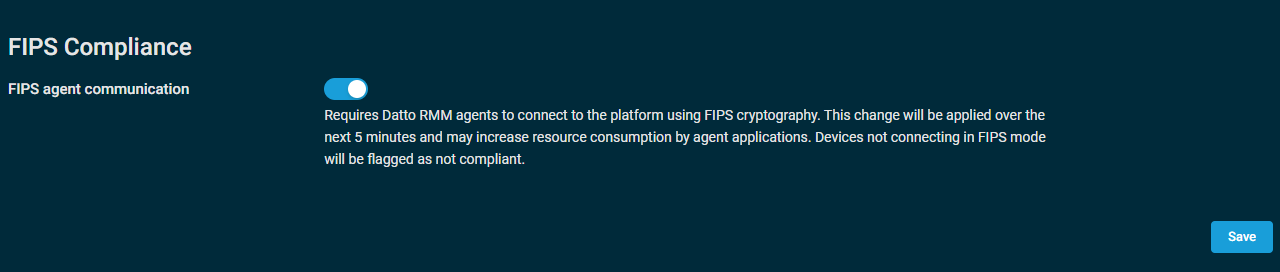
- Locate the FIPS Compliance section.
- Enable the FIPS agent communication toggle and click Save.
- Open a device list or device details page and review the FIPS status of your devices.
Once enabled, Datto RMM will use FIPS 140-3 validated cryptography for in-scope communication channels. Devices that can use the validated module show a FIPS status of Compliant. Devices that can't use it stay connected over the standard secure connection and show Non-Compliant. To turn FIPS communications off, return to Global Settings and disable the FIPS agent communication toggle.
NOTE After changing FIPS Compliance settings, The change will be applied over the next 5 minutes and may increase resource consumption by agent applications.
FIPS status
The FIPS status will show device list and details pages, on dashboards, in custom device filters, and in Web Remote session windows. The possible values are Compliant, Non-Compliant, and Unsupported OS.
| Fips Status | Description |
|---|---|
| Compliant | The device communicates with the platform by using FIPS validated cryptography. |
| Non-Compliant | The Agent couldn't establish communications with the FIPS validated cryptographic module. The device connects over the standard secure connection. |
| Unsupported OS | The operating system of the device doesn't support FIPS validated communications. |
FIPS Compliance Summary dashboard widget
The FIPS Compliance Summary dashboard widget shows how many devices are compliance across your account or for specific sites. This widget is available in the Widget Library.
FIPS Status filter criterion
You can filter for FIPS compliant devices using the FIPS Status filter criterion. You can filter for Compliant or Non Compliant devices. For information on creating filters, refer to Device filters.


