Datto RMM 14.8.0 release notes
Schedule*
| Platform | Date | From (UTC) | To (UTC) | Duration |
|---|---|---|---|---|
| Syrah (APAC) | Wednesday, February 4, 2026 | 14:00 | 18:00 | 4 hrs |
| Vidal (US East) | Monday, February 9, 2026 | 08:00 | 12:00 | 4 hrs |
| Pinotage (EU1) | Tuesday, February 10, 2026 | 17:00 | 21:00 | 4 hrs |
| Zinfandel (US West) | Wednesday, February 11, 2026 | 08:00 | 12:00 | 4 hrs |
| Merlot (EU2) | Thursday, February 12, 2026 | 17:00 | 21:00 | 4 hrs |
| Concord (US East) | Monday, February 16, 2026 | 08:00 | 12:00 | 4 hrs |
NOTE *The schedule is subject to change. Check the Status page for regular updates. Any changes made to the original schedule are denoted in red.
IMPORTANT This is a full platform and Agent release; therefore, partners should expect brief disconnections of the Agent during the update window.
Datto RMM Agent version upon release deployment: 10748
Legacy UI deprecation notice:
IMPORTANT As of this release, you will no longer be able to access the Legacy UI. All functions that were dependent on the Legacy UI have been migrated to the New UI. Please see the expanded release note below
About the release
The 14.8.0 release is the first of our 2026 releases. Please see below for the highlights, along with the full list of fixes and improvements. As always, we look forward to your feedback as we continue to improve the product with each release.
The Datto RMM team is reaffirming its commitment to delivering important updates more frequently through officially recognized interim releases. These releases will typically include urgent bug fixes or minor enhancements and will not require scheduled maintenance windows. Details of the updates since the previous full release will be included in Updates since this release.
Removal of the Legacy UI to accelerate innovation and improve security
As previously announced, the Legacy UI is being deprecated, and will no longer be available with the rollout of the 14.8.0 release.
Please review the details of this change below:
- The Legacy UI redirect has been removed from the left navigation menu. As of this release, it is no longer possible for product users to access the Legacy UI.
- Legacy UI dependencies have been removed from the login process for users authenticating from Datto Portal, Autotask, KaseyaOne and Agent Browser.
- The IP address validation flow for new users has been migrated to the new UI, preserving existing security checks while removing dependency on the legacy interface.
- Legacy UI agent download URLs will remain operational and return valid binaries for the duration of the sunset period. Kaseya is implementing usage tracking to better understand how these legacy URLs are used, helping us plan future improvements and communicate any changes well in advance.
This reduction in technical debt allows us to deliver front-end improvements faster and at greater scale, while the streamlined, modern authentication flow provides a more secure and consistent login experience.
NOTE Documentation relating to the Legacy UI is no longer available.
Patch audit improvements to better align with Windows Update
With this release, Datto RMM provides a more accurate reflection of your devices’ patch update status, closely matching what you see in Windows Update. This enhancement ensures that patch audits in Datto RMM align with Microsoft’s native Windows Update logic, including improved handling of driver updates, optional updates, and update identification. As a result, you gain greater confidence in patch compliance reporting and device security posture across your managed environments.
- Patch audit logic now mirrors Windows Update’s default search behavior, including proper handling of the Online flag related to WSUS configuration, and driver update exclusions based on system policy.
- The patch audit now explicitly includes optional quality updates, aligning with Windows’ default deployment actions.
- Update identification has been enhanced to avoid misreporting superseded or revised updates.
- These changes affect the audit/search process for Windows devices managed by Datto RMM. No changes have been made to installation or remediation workflows.
- No new UI elements have been introduced; all changes are back-end logic improvements.
Datto RMM licenses will only be consumed for approved new devices
Datto RMM licenses are only consumed by devices that have been explicitly approved. Unapproved devices will no longer count toward your license usage, helping you avoid unexpected billing from unauthorized installations. This update gives you greater control and transparency over your license allocation, aligning usage with your organization’s approved device activity. Refer to Licenses.
- New device deployments will remain unlicensed until approved on the Device Approvals page in Datto RMM.
- License counts on the Licenses page and values sent to our billing team now reflect only approved devices.
- Devices pending approval due to encryption key changes are not excluded from license consumption; only devices pending initial approval are omitted.
- There is no impact on Integrated Customer Billing logic or reporting.
- This change applies only to the Datto RMM licenses page and for the purposes of CMQ billing.
Web Remote performance and reliability improvements
- Web Remote has been updated to provide faster, more responsive Web Remote sessions thanks to improved image compression and optimizations to the underlying remote desktop protocol. Screen updates are now smoother and input latency has been reduced by approximately 15% compared to previous releases.
- Enhanced tunnel selection logic has been implemented, ensuring sessions connect through the optimal tunnel server. This reduces initial connection failures and improves performance overall.
- Web Remote has been optimized to address edge cases that previously caused unnecessary session restarts. This update is expected to deliver a modest but meaningful increase in successful first-attempt connections, enhancing your overall remote management experience.
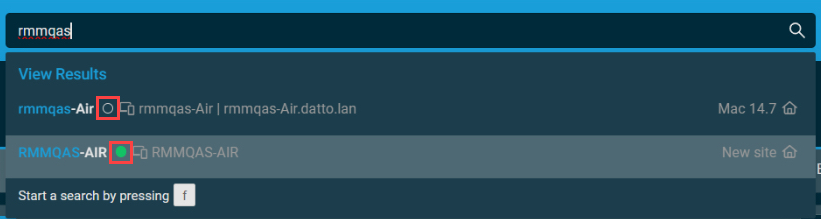
Global search and device groups updated to show devices online status
Global search has been updated to display whether a device is online or offline directly in global search results and device group listings. This enhancement makes it easier to identify device availability at a glance. This change takes to the form of a green dot to indicate a device is online, or an empty dot to indicate a device is offline. This enhances our global search with clear, consistent status visibility across the platform. Refer to Global search.
Microsoft 365 Integration
Intune Device Management Enhancements
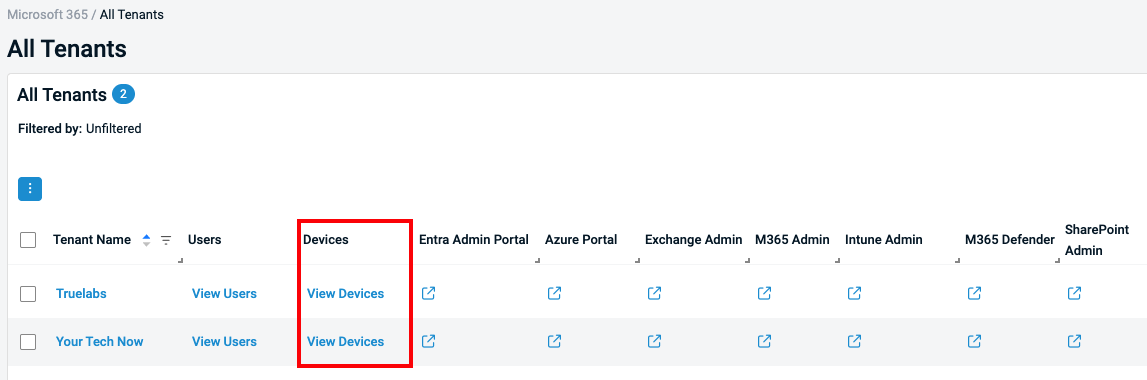
- Added new View Devices table in the All Tenants view for quicker access to tenant-specific device management. Refer to Devices Column.
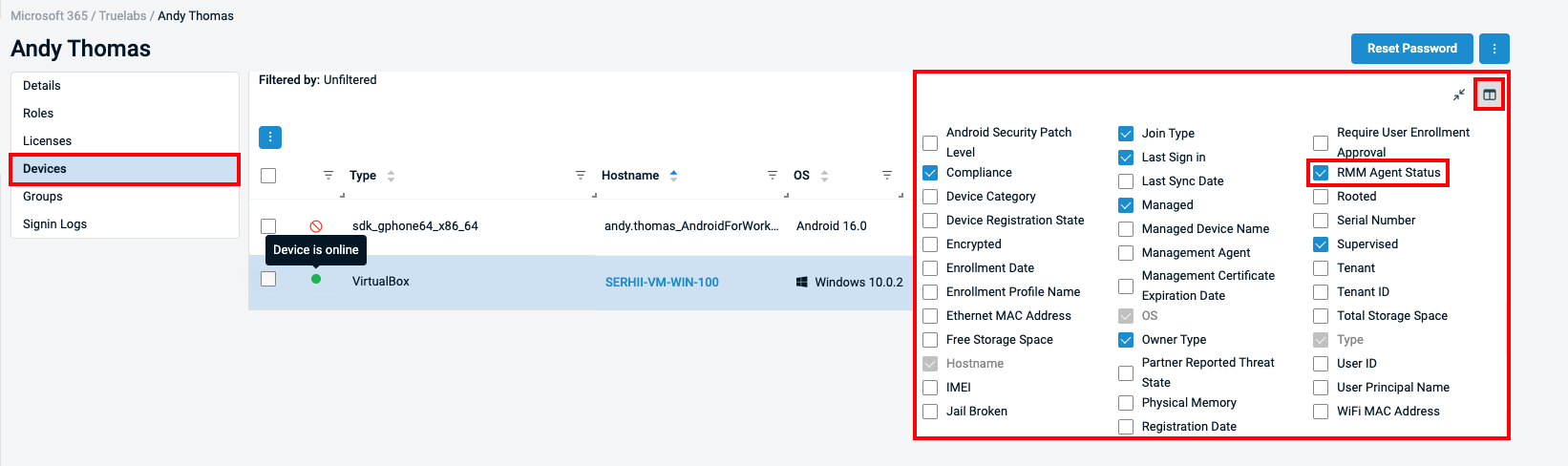
- Added the RMM Agent Status property in the user Devices Column Chooser to indicate whether the RMM agent is installed and online on enrolled Windows Intune devices. Refer to RMM Agent status.
- Device is online: The Datto RMM agent is installed and online.
- Device is offline: The Datto RMM agent is installed but the device is offline.
- RMM agent not installed: The Datto RMM agent is not installed on this device.
- RMM agent not supported: Datto RMM agent cannot be installed on this device as it is an unsupported device format, such as a mobile device or tablet.
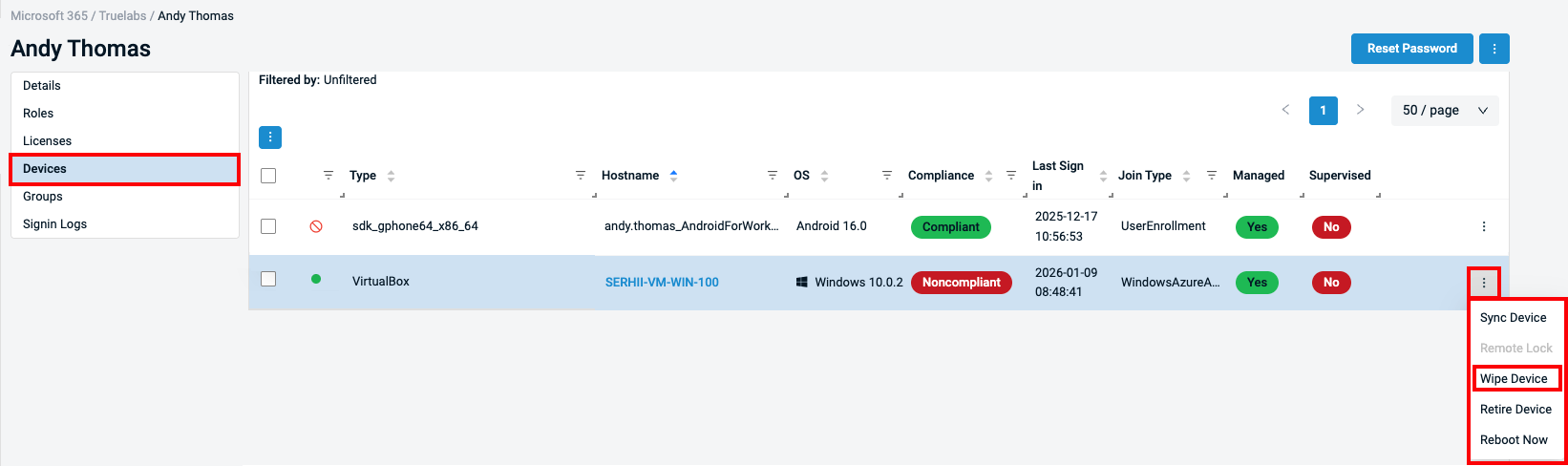
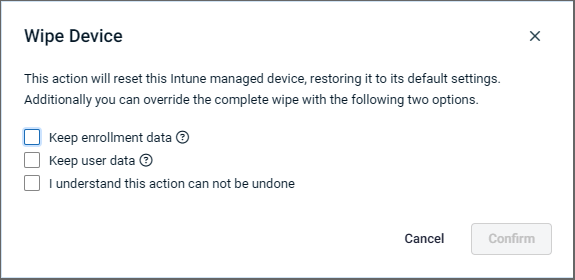
- In the Wipe Device Intune Quick Action on enrolled devices, 2 additional options have been added:
- Keep enrollment data: Resets the device to factory settings while keeping its Intune and Entra ID enrollment. All user data and apps are removed, and the device is automatically re-provisioned without requiring re-enrollment
- Keep user data: Removes Intune management and corporate policies while keeping the user’s personal data. The device is unenrolled from Intune and Entra ID, but user files and profiles remain on the device.
Refer to Intune Quick Actions.
- Improved Intune device to RMM device interlinking. Clicking on the hostname for Intune-enrolled M365 devices now redirects to the device card when the Datto RMM agent is installed on the Windows device. Refer to Devices card.
-
Renamed the Compliance property from Non-compliant to Noncompliant to align with Intune naming standards.
User and Group Management
- Separated User and Tenant Device fetch events for improved performance
Sync Status and Activity Logging
- Added new GDAPNotAvailable sync status for clearer GDAP configuration feedback.
- More detailed activity log records for M365 actions against users and devices are now available in the Activity Log, enhancing audit trails.
In addition, several bugfixes have been applied. Refer to Microsoft 365 Integration in the Updates in this release section.
Alert details now include component response details
Alert details for alerts that have a component response will now include response component details, as well as the output details (StdOut, StdErr) from the component.
Additions to the ComStore
We release new ComStore components and update existing ones every month. Notable additions this month include the following:
- Install & Activate Windows MAK Licence/License Key [WIN]: This component allows you to install an MAK (Multiple Activation Key) product key for Windows. It can also be used to install an ESU (Extended Security Update) for Windows 10 systems.
- Get Detailed File Information or Delete [WIN]: This component checks a user-specified file path on the local device and provides detailed information on that file, such as when it last modified, which account owns the file, and if it has a digital signature, among several other data points available in the file metadata. This component can also delete the target file without executing it.
ComStore Integrations
NOTE To access a full list of ComStore components, refer to List of ComStore components.
Advanced Software Management: February updates
There are no notable updates for this release.
Refer to Advanced Software Management and Advanced Software Management application catalog.
Updates since this release
Below are release notes for any minor releases that occurred during this release cycle before the next full release. Releases are organized in order with the highest release number at the top.
Datto RMM Version 14.8.3
No maintenance window is required for this release.
Web Remote
| Type | Summary |
|---|---|
| Foundation | Changes have been made to improve the reliability of the initial connection attempt for Web Remote. |
| Foundation | Web Remote logging in the Audit Log has been improved, allowing for easier diagnoses of connection issues. |
| Foundation | Back-end logging has been improved to help with support diagnosis of DNS and server connection issues. |
Datto RMM Version 14.8.2
This update decouples the new UI from the legacy CSM system across two areas:
- Removing CSM from the login flow so authentication works even when CSM is down.
- Updating routing configuration so Agent Browser and Datto Portal logins correctly point to the new UI and SAML endpoints.
IMPORTANT The 14.8.2 release will require a brief maintenance window where Datto RMM will be unavailable. Please review the schedule below.
14.8.2 Maintenance window schedule
NOTE *The schedule is subject to change. Check the Status page for regular updates. Any changes made to the original schedule are denoted in red.
| Platform | Date | Starting Time(UTC) |
|---|---|---|
| Zinfandel (US West) | March 21, 2026 | 14:00 |
| Syrah (APAC) | March 28, 2026 | 14:00 |
| Vidal (US East) | March 28, 2026 | 14:00 |
| Pinotage (EU1) | March 28, 2026 | 14:00 |
| Merlot (EU2) | March 28, 2026 | 14:00 |
| Concord (US East) | March 28, 2026 | 14:00 |
Autotask Integration
| Type | Summary |
|---|---|
| Fix | Resolved an issue where links from Autotask PSA did not always redirect to the current Datto RMM UI. |
| Fix | Resolved an issue where Autotask PSA extension callouts to the CSM service were failing after the resolve-alert endpoint was migrated to a new service. |
User Interface
| Type | Summary |
|---|---|
| Fix | Resolved an issue where some accounts would experience issues when loading the Software Management page at the global and site levels. |
| Fix | Resolved an issue where failure notifications were not displayed when user switching was unsuccessful. A clear message now appears if the switch user action fails. |
Datto RMM Version 14.8.1
No maintenance window is required for this release.
Web Remote
| Type | Summary |
|---|---|
| Foundation | Improved performance when connecting to devices with multiple monitors. Now, only the data for the monitor you’re actively viewing is sent, reducing bandwidth usage and ensuring a smoother, more responsive remote session. |
| Foundation | Agent-side performance optimizations have been implemented for Web Remote sessions, minimizing unnecessary external API calls and streamlining frame capture, image manipulation, and response sending. |
| Foundation | Reduced session latency as a result of significant reductions in protocol message traffic. By cutting the number of messages exchanged during each session by half, we’ve improved responsiveness and minimized delays, ensuring a smoother experience for technicians. |
| Fix | Fixed an issue where you could not connect to Mac systems via Web Remote if the username contained a period (.) or began with one or more digits. Web Remote now supports all valid Mac usernames, ensuring consistent remote access across your devices. |
User Interface
| Type | Summary |
|---|---|
| Fix | Fixed an issue where the Site Group link in filter details directed users to the legacy UI instead of the correct Site Group page. Clicking the Site Group link in filter details now opens the intended Site Group view. |
Want to know what's coming next?
Interested in what we’re currently working on and the broader roadmap vision? Check out the Datto RMM resources feed and watch the latest Quarterly Innovations Update for a glimpse into product priorities.
Updates in this release
Activity Log
| Type | Summary |
|---|---|
| Fix | The device Activity Log now contains StdOut details for failed patch activity. |
Agent
| Type | Summary |
|---|---|
| Fix | Resolved an issue during the Agent update process where unnecessary overwrites of artifacts that don’t change after installation would cause the update to fail in some cases. If a file appears corrupt during an update, the system now retries extraction several times and logs any persistent errors in device logs for easier identification and resolution. This reduces the risk of agent corruption and helps keep your devices connected. |
| Fix | Resolved an issue where the agent process could take up to five minutes to terminate during user-initiated shutdowns, eliminating unnecessary delays and improving overall device responsiveness. |
Components
| Type | Summary |
|---|---|
| Fix | Component download links will now properly fallback to the component proxy instead of an amazon S3 link |
Dashboard
| Type | Summary |
|---|---|
| Fix | Viewing dashboard filter widgets for non-admin users with limited site visibility no longer display errors. |
Device Onboarding
| Type | Summary |
|---|---|
| Fix | Manually adding a network device to RMM no longer fails with an error. |
KaseyaOne Integration
| Type | Summary |
|---|---|
| Fix | The Datto Networking integration now handles data associations correctly during deletion events, resolving the issue where some accounts lacked data after configuration. |
| Fix | Resolved an issue where a user deleted from KaseyaOne would not deactivate in Datto RMM with Automatic User Deprovisioning enabled. |
Microsoft 365 Integration
| Type | Summary |
|---|---|
| Fix | Fixed an issue where the Microsoft 365 integration only displayed the integration-authenticated tenant. |
| Fix | Resolved inability to reset passwords using the integration. |
| Fix | Fixed an issue where devices were disappearing from All Devices view. |
| Fix | Fixed an issue where selected columns would no longer display after applying a filter. |
| Fix | Corrected erratic pagination behavior in GetAllDevices. |
| Fix | Fixed incorrect sorting and empty device lists when sorting by last sign-in. |
| Fix | Resolved a mismatch that occurred between userDevice and device objects; fixed duplicate devices appearing. |
| Fix | Fixed an issue where tenants would fail to sync with an "Unsupported token" authorization error. |
| Fix | Resolved an issue where successfully synced tenants weren't displaying users due to a back end error. |
| Fix | Fixed overlapping text on M365 not integrated tab. |
| Fix | Resolved the frontend API error : "Cannot destructure property 'userType' of null". |
User Interface
| Type | Summary |
|---|---|
| Fix | Resolved an issue where the tooltip for the Web Remote button could block access to the button in the device list. You can now reliably access Web Remote without the tooltip getting in the way. |
| Fix | The global and site-level Software Management page now successfully fetches managed software details, even when the results include a large number of software items. |
| Fix | The Software Management card has been optimized to reduce the loading time of the software list. |
Patch Management
| Type | Summary |
|---|---|
| Fix | The Patch Management Agent has been updated to support the discovery and installation of optional Windows updates in addition to standard updates. Previously, the Agent’s Windows Update search query did not explicitly specify this in the deployment action criteria, causing some optional updates to be omitted from audit results and installation workflows. |
Policies
| Type | Summary |
|---|---|
| Fix | Resolved an issue where the deployment of policies or jobs was prevented if a filter with the Last User or UDF custom device filter criterion contained a backslash character. |
Reports
| Type | Summary |
|---|---|
| Fix | The device Activity Log now shows the device note value instead of the action and user who entered the note. |
ComStore updates
IMPORTANT This table does not list updates for components that are installed via Software Management.
NOTE To access a full list of ComStore components, refer to List of ComStore components.
| Component Name | Platform | New/Changed | Description/Change Summary |
|---|---|---|---|
| Install & Activate Windows MAK Licence/License Key [WIN] | Windows | New | |
| Get Detailed File Information or Delete [WIN] | Windows | New | |
| Disk Health (SMART) Monitor [WIN] | Windows | Updated | Various improvements |
| Windows 10 ESU Monitor [WIN] | Windows | Updated | Added 'fallback' for alternative ESU subscription |
| Download/Verify + Install File/EXE/MSI by URL [WIN] | Windows | Updated | Fixed an issue where SIG would sometimes not appear |
| Datto Endpoint Backup (Unified) Monitor [WIN] | Windows | Updated | Added phrases to allowlist to prevent false alerts |
| Domain Controller Monitor v4 [WIN] | Windows | Updated | Bugfixes |
| Windows Update Toolkit [WIN] | Windows | Updated | Added Audit criteria |
| Datto Endpoint Backup Agent v1 [WIN] | Windows | Updated | Vendor updates |
| Windows 11: Upgrade or Update to Latest Feature Release [WIN] | Windows | Updated | Added dialogue about the antivirus interference |
| FileVault 2 [MAC] | macOS | Updated | Added ability to audit without enabling FV2 |
| Acronis Cyber Protect - Monitoring [WIN] | Windows | Updated | Vendor update |
| Display Branded Toast Notification/Reboot [WIN] | Windows | Updated | Fixed issue where notifications sometimes failed to appear |
| Splashtop Streamer Pre-Installer [WIN] | Windows | Updated | Changed executable invocation method |


