Datto RMM 15.0.0 release notes
Schedule*
| Platform | Date | From (UTC) | To (UTC) | Duration |
|---|---|---|---|---|
| Syrah (APAC) | Monday, May 18, 2026 | 14:00 | 18:00 | 4 hrs |
| Vidal (US East) | Wednesday, May 20, 2026 | 08:00 | 12:00 | 4 hrs |
| Merlot (EU2) | Thursday, May 21, 2026 | 17:00 | 21:00 | 4 hrs |
| Concord (US East) | Wednesday, May 27, 2026 | 08:00 | 12:00 | 4 hrs |
| Zinfandel (US West) | Thursday, May 28, 2026 | 08:00 | 12:00 | 4 hrs |
| Pinotage (EU1) | Monday, June 1, 2026 | 17:00 | 21:00 | 4 hrs |
NOTE *The schedule is subject to change. Check the Status page for regular updates. Any changes made to the original schedule are denoted in red.
IMPORTANT This is a full platform and Agent release; therefore, partners should expect brief disconnections of the Agent during the update window.
Datto RMM Agent version upon release deployment: 11616
Announcements
Notes in this section are related to important upcoming changes that are coming as part of this or a future release.
Agent Support for legacy OS versions
Starting with the 15.1.0 release, the Datto RMM agent will no longer be supported on Windows Server 2012 or Windows Server 2012 R2, which have already reached end-of-life and no longer receive security or compatibility updates from Microsoft.
New agent installations will no longer be supported on these operating systems or other legacy Windows, macOS or Linux versions not listed on our Supported operating systems and Agent requirements page. Existing agents already installed with previously supported operating systems may continue connecting to the Datto RMM platform but will no longer receive agent updates or be maintained, tested, or supported by Datto going forward, and we cannot guaranty compatibility with future product updates.
Running production workloads on unsupported operating systems exposes them to unpatched vulnerabilities and increasing compatibility risk. We strongly recommend upgrading managed devices to a supported operating system as soon as possible to:
- Continue receiving product updates and security fixes
- Ensure compatibility with future Datto RMM releases
- Maintain compliance with regulatory frameworks such as FIPS, CMMC, and similar standards, which typically require running on vendor-supported operating systems
Legacy policy enforcement deprecation
In the upcoming 15.1.0 release, legacy Webroot and Power Management policies will no longer be enforced on Datto RMM Agent installed machines.
About the release
The 15.0.0 release is the third of our 2026 releases. Please see below for the highlights, along with the full list of fixes and improvements. As always, we look forward to your feedback as we continue to improve the product every single month.
The Datto RMM team is reaffirming its commitment to delivering important updates more frequently through officially recognized interim releases. These releases will typically include urgent bug fixes or minor enhancements and will not require scheduled maintenance windows. Details of the updates since the previous full release will be included in Updates since this release.
Web Remote reliability improvements
This release improves the reliability of Web Remote connections by introducing DNS fallback mechanisms and enhanced DNS analytics logging in both the Datto RMM Agent and the Web Remote component. These changes directly reduce initial connection failures caused by DNS resolution issues on target devices, supporting a more reliable remote desktop experience for technicians.
Key features
- DNS fallback is implemented in both the Datto RMM Agent and Web Remote component communications channels on the target device.
- On DNS resolution failure, the system first attempts to use the device’s configured DNS, then automatically retries with a set of known good public DNS servers.
License and billing updates
Variable usage reminders
Administrators now receive updated in-product reminders to review variable license usage ahead of month-end billing calculations.
- Informational banners now appear as month end approaches, helping administrators review variable license usage and avoid unexpected charges.
- Each banner includes quick access to related licenses and notification settings.
- Notifications are shown only when variable usage is greater than zero.
Activation and deactivation controls
Advanced Software Management and Ransomware Detection can now be activated and deactivated directly from the Licenses page.
- Activation now requires an explicit acknowledgment of inclusion in variable billing calculations.
- When usage reaches zero, you can deactivate a feature and re-enable it later if needed.
- License cards include links to learn more about each feature before you decide whether to activate it.
Policy-level usage details
Policy-level visibility into Advanced Software Management and Ransomware Detection license usage is now available from the Licenses page.
- Use View Details to see which policies are contributing to license consumption.
- Review per-policy device counts to understand what is driving usage.
- Open related policies directly to review and adjust configuration.
For more information on these updates, refer to Licenses.
Device page improvements
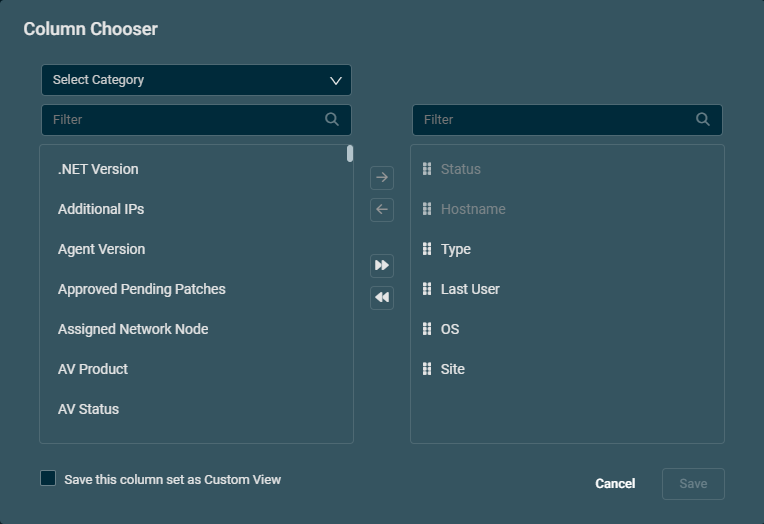
The Column Chooser for device list pages has been redesigned for quicker, easier navigation. You can now search columns by name, drag and drop to reorder columns, use Shift+Click to select multiple items, and filter by category, making it much easier to manage custom views, even with 300 UDFs. Refer to Using the Column Chooser.
Extended SNMPv3 protocol support
Network Discovery and Monitoring now support new SNMPv3 authentication and privacy protocols, improving compatibility with security-hardened devices. Refer to SNMP credentials.
Key improvements
- New authentication protocols: SHA-256, SHA-384, and SHA-512 are now available for SNMPv3 credentials alongside existing MD5 and SHA-1 options.
- New privacy (encryption) protocols: 3DES, AES-192, and AES-256 are now supported in addition to existing DES and AES-128.
Network Discovery page redesign
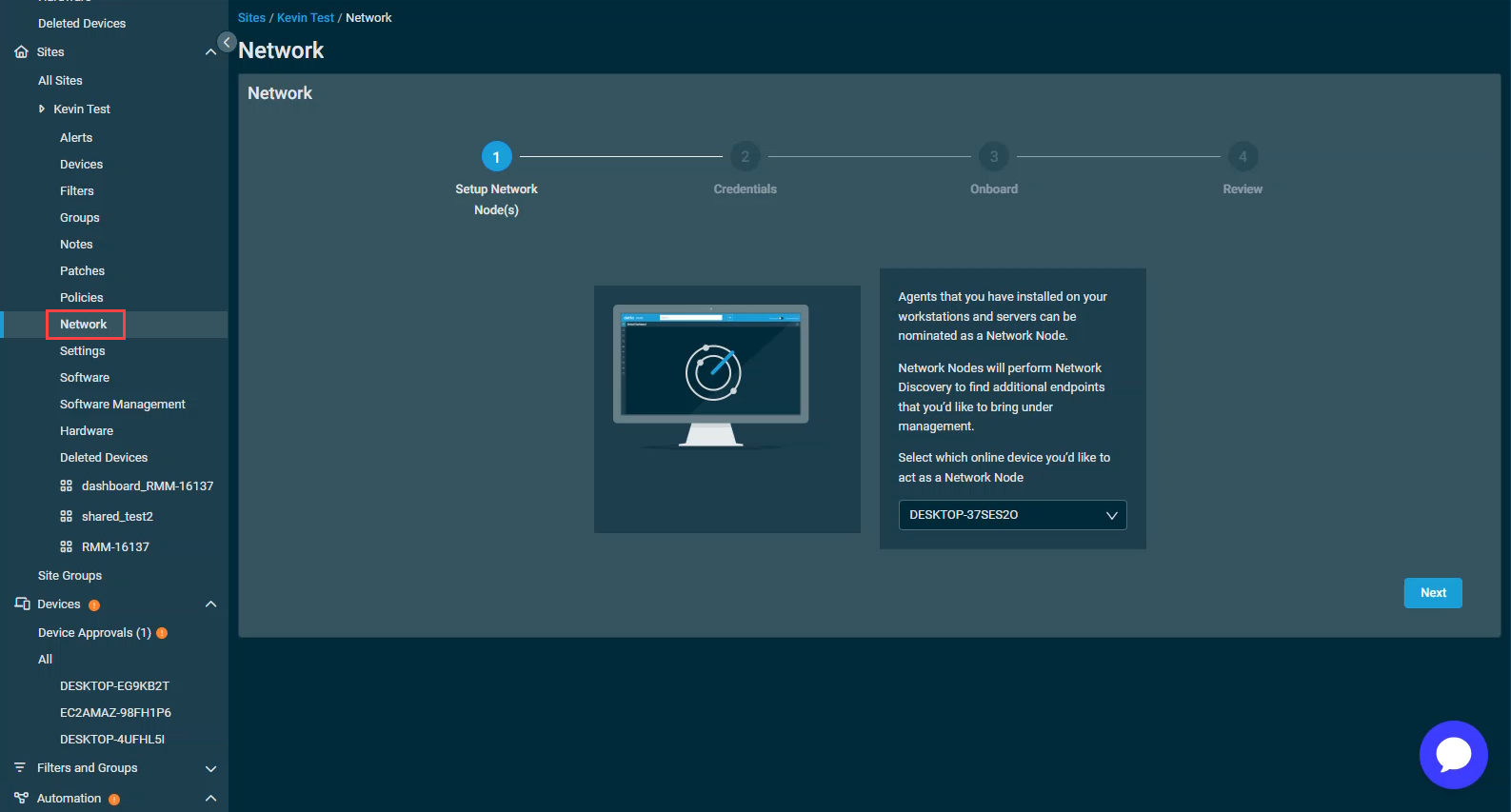
The Network Discovery page has been renamed to Network, reflecting its broader scope beyond discovery to include node and subnet configuration. For more information, refer to the updated Networks page.
Key improvements
In addition to the page being renamed, a new Network Nodes tab has been added to the Network page. This is a dedicated tab for orchestrating network nodes (with multi-node support) and managing subnets. Notable new features on this page include:
- The ability to nominate eligible devices as network nodes (with configurable scanning status).
- View node details at a glance: device name, IP, subnets (CIDR), scanning status, assigned devices, and more.
- Unassign nodes with the option to reassign devices to another active node.
- Multi-node support per site for broader network discovery coverage.
- A dedicated Additional Subnets section for managing custom subnets per site in one location
- Add custom subnets in CIDR format with inline validation.
- Edit subnet CIDR and description inline.
- Delete custom subnets no longer needed.
- Overlapping subnets (auto-detected vs. custom) are allowed.
NOTE With this update, the Additional Subnets section will be removed from the Site Settings page, Create Site page, and the old Network Discovery wizard, consolidating all subnet management into the new Network Nodes tab.
NOTE As announced last release, going forward Additional Subnets will use CIDR notation (for example: 192.168.1.0/24) instead of the IP ranges format. CIDR is the modern industry standard for defining network ranges, as it is more precise, consistent with broader networking tools, and reduces the risk of misconfiguration. For more information, refer to On CIDR notation.
NOTE All existing additional subnet entries will be automatically converted to CIDR format upon upgrade. No action is required on your end.
Variables: Security notice banner for sensitive data
When you work with variables across Datto RMM (in Global Settings, Components, Site Settings, Jobs, and Monitoring policies) you now see a Security Notice banner next to the Variables section. This helps you make informed decisions when using sensitive data within variables.
![A security notice that reads: "When using variables, be aware that their values may, in certain circumstances, be briefly visible in system memory to those with IT] privileged access to that endpoint during script execution. Please use discretion when inputting sensitive values in these fields."](../../../Resources/Images/0HOMEImages/ReleaseNotes/DattoRMM_15.0.0/SecurityNoticeBanner.png)
Patch Management: Patch status reporting improvements
- Devices now retain their last patch status and data after a patch scan failure, instead of showing No Data and clearing patch information. This preserves visibility into installed and missing patches.
- A new Last Successful Patch Audit Date field appears on the device details page and as a sortable column in device lists, enabling quick assessment of data freshness and identification of devices with ongoing scan issues.
Additions to the ComStore
We release new ComStore components and update existing ones every month. Notable additions this month include the following:
- Get/Set Windows Hello Max/Min PIN Length [WIN]: Use this component to retrieve and set the Windows Hello PIN length.
- Windows Defender Configuration Tool [WIN]: Configure Windows Defender remotely with this component.
- User Toolkit [MAC][LIN]: Allows user creation, configuration, and deletion for *nix type systems.
NOTE To access a full list of ComStore components, refer to List of ComStore components.
Advanced Software Management: May updates
No notable updates in this release.
Refer to Advanced Software Management and Advanced Software Management application catalog.
Updates since this release
Below are release notes for any minor releases that occurred during this release cycle before the next full release. Releases are organized in order with the highest release number at the top.
UltraVNC Component update
Hotfix release date: July 13, 2026
Released a hotfix that updates the bundled UltraVNC component to version 1.8.2.4. No customer action is required. For more information, refer to UltraVNC CVE applicability assessment.
Datto RMM Version 15.0.1
Datto RMM Agent version upon 15.0.1 deployment: 11915
Enhancements
Web Remote: DNS fallback for more reliable connections
Improves the reliability of Web Remote connections by introducing DNS fallback mechanisms and enhanced DNS analytics logging in both the Datto RMM agent and the Web Remote component. These changes directly reduce initial connection failures caused by DNS resolution issues on target devices, supporting a more reliable remote desktop experience for technicians.
- DNS fallback is implemented in both the AEM agent and Web Remote component communications channels on the target device.
- On DNS resolution failure, the system first attempts to use the device's configured DNS, then automatically retries with a set of known good public DNS servers.
Web Remote: Improved time to first interaction
Enhanced the user experience by defaulting new sessions to a single monitor view instead of the previous all-monitors view. This reduces initial load time and gets users to their first interaction faster.
Splashtop: Real-time Streamer installation status for technicians
When a technician initiates a Splashtop session that requires installing the Splashtop Streamer on the user's machine, the technician now receives real-time status feedback throughout the installation process. Previously, no feedback was provided and technicians had to repeatedly retry connecting with no indication of whether installation was in progress, completed, or had failed.
Device Summary UDF Card: Smart sorting puts populated fields first
The Device Summary UDF Card now surfaces populated UDF fields at the top, ordered by UDF number, so technicians can see active data at a glance without scrolling past empty fields. Sorting by value and by label is also supported. Empty UDFs remain accessible but are visually de-prioritized.
Device Filters: Filter by Last Successful Patch Audit
You can now filter devices by Last Successful Patch Audit in custom Device Filters. This new filter criterion is available on both the Devices and Deleted Devices pages and supports the following operators: before, after, older than 7/14/30/60/90 days. Devices with no patch audit date on record are automatically excluded from filtered results.
Immediate job execution: Agent now notified instead of polling
When an immediate job is deployed to a device, the agent is now notified directly rather than waiting up to a minute for its next polling cycle. This change reduces the delay between job deployment and job execution, allowing immediate jobs to start as soon as the deployment has persisted.
Fixes
- Resolved an issue where the Total Devices column in the Global and Site Patches view could become unchecked and grayed out for some users, preventing them from re-enabling it or resetting the view to its default state. Users affected by this issue now have the column correctly restored, and the column chooser and reset behavior work as expected across Global, Site, and Device patch views.
- Resolved an issue where the Windows Agent installer could be downloaded as a corrupted file of approximately 100 KB rather than the expected size of around 10 MB, making it unusable for device enrollment.
- Resolved an issue where the Agent Browser could take up to a minute to open after a fresh agent restart, and initial launches from the web portal did not always auto-login as expected.
- Resolved an issue where A 0x80070057 error could occur during a device patch audit when a driver update returned a null value from the Windows Update API. The agent now handles this case and patch audits complete without error.
- Resolved an issue where file transfer (upload and download) failed during Web Remote sessions when a DNS fallback was in use.
- Resolved an issue where UDF values from a previously viewed device were incorrectly displayed on a different device that had no UDFs populated. Device UDF data is now correctly scoped to the selected device.
- Resolved an issue where non-admin users encountered a misleading widget is trying to use a device filter that has been deleted error on login or page reload.
- Resolved an error where selecting a UDF as a search criterion in the global search bar and pressing Enter caused an error instead of returning search results.
- Resolved an issue where UDF values sent by the agent were delayed or failing to appear in the UI, even when the agent had picked up registry values and transmitted them successfully.
- Resolved an issue where BCDR devices using the Datto Continuity integration were incorrectly reported as offline in Datto RMM even when they were active.
- Resolved an issue where attempting to uninstall software from the Device Summary Software tab could result in a We're having trouble performing this action error due to a job initialization failure.
Want to know what's coming next?
Interested in what we’re currently working on and the broader roadmap vision? Check out the Datto RMM resources feed and watch the latest Quarterly Innovations Update for a glimpse into product priorities.
Updates in this release
API
| Type | Summary |
|---|---|
| Foundation | The advanced search capabilities added in {{/v2/activity-logs}} allow you to narrow down results and find relevant log entries using field searches, wildcards, and boolean operators. The new searchQuery parameter supports the same search queries and syntax as a corresponding UI field, and allows it to carry out advanced querying of the Activity Log, reducing client-side filtering and fewer API calls for common use cases. |
Comstore
| Type | Summary |
|---|---|
| Fix | Email notifications for new and updated ComStore components are now delivered more reliably. |
Device management
| Type | Summary |
|---|---|
| Foundation | Device list performance has been improved when filtering by user-defined fields. |
Jobs
| Type | Summary |
|---|---|
| Foundation | Scheduled jobs that are due to run are now picked up and started more efficiently, helping reduce delays during busy periods. |
| Foundation | Scheduled job status updates are now processed more efficiently, helping completed and expired jobs appear with less delay. |
| Foundation | Background job processing now scales more smoothly during periods of higher demand, helping maintain capacity for heavier job workloads. |
| Fix | The job results export now supports targeted devices with blank or missing descriptions. |
Kaseya Intelligence
| Type | Summary |
|---|---|
| Fix | Fixed an issue where the Date Range field label disappeared after choosing a custom date range. It now shows Custom and correctly displays the start and end dates. |
| Fix | Insights results now show less blank space, making them more compact and appealing. |
KaseyaOne Integration
| Type | Summary |
|---|---|
| Fix | The Ideas Portal link in the Help menu now opens the current Datto RMM Ideas Portal. |
| Fix | Users can now show or hide Kaseya Assist from My Settings > Preferences. |
macOS
| Type | Summary |
|---|---|
| Fix | The macOS hardware audit now supports all current 2026 Apple models. |
Microsoft 365 Integration
| Type | Summary |
|---|---|
| Fix | Fixed an unexpected error when sorting and filtering columns in Microsoft 365 > All Devices. |
| Fix | Performance improvements have been implemented to enhance the search functionality. Specifically, the search process now avoids making a database call on every single keystroke entered by the user. |
Monitoring
| Type | Summary |
|---|---|
| Foundation | Monitor alert processing is now more resilient when alert delivery encounters repeated failures. |
| Foundation | SNMP monitor alerts with special characters in the instance name are now handled more reliably during auto-resolution. |
Reporting
| Type | Summary |
|---|---|
| Fix | Reports and exports no longer cap targets to 100 devices if the filter used has 100+ devices. |
User interface
| Type | Summary |
|---|---|
| Foundation | Login sessions are now handled more reliably, helping reduce intermittent timeouts. |
| Fix | The Context field for SNMP v3 credentials is no longer incorrectly marked as required when adding a Network Device via the Add Device interface. Previously, leaving this field blank would display a This field is required error, even though the field is optional. The behavior now matches the Setup > Credentials > Add Credentials UI, where the Context field can be left blank as expected. |
| Fix | Date ranges on license usage cards now display in ISO 8601 format to align with international standards. |
| Fix | Fixed an issue where bulk deleting a large number of devices (200+) displayed a false Delete devices failed error notification, even though all devices were deleted successfully. |
Software Management
| Type | Summary |
|---|---|
| Fix | Updated managed software packages now download and deploy more reliably. |
ComStore updates
IMPORTANT This table does not list updates for components that are installed via Software Management.
NOTE To access a full list of ComStore components, refer to List of ComStore components.
| Component Name | Platform | New/Changed | Description/Change Summary |
|---|---|---|---|
| Dell Server Monitor | Windows | Updated | Various compatibility improvements |
| Get/Set Windows Hello Max/Min PIN Length | Windows | New | Configures Windows Hello's PIN length parameters. |
| Windows Defender Configuration Tool | Windows | New | Configures Windows Defender. |
| Microsoft Entra Device ID in UDF | Windows | Updated | Now uses a static DLL instead of compiling one on the fly. |
| Monitor Windows Reliability Index | Windows | Updated | Bugfixes |
| Change Wallpaper (Background) and Lock Screen | Windows | Updated | Added ability to return user control by running with blank values |
| Download and apply Windows Update File | Windows | Updated | Bugfixes |
| User Toolkit | macOS & Linux | New | Allows user creation, configuration, and deletion for *nix type systems. |
| Microsoft Secure Boot CA Audit | Windows | New | Use alongside Microsoft Secure Boot CA Monitor. |
| RMMMax BitLocker Collection | Windows | Updated | Vendor Update |
| RMMMax Update Manager | Windows | New | |
| RMMMax Update Manager | macOS & Linux | New | |
| RMMmax Reboot Manager | Windows | New | |
| RMMmax Reboot Manager | macOS & Linux | New | |
| RMMmax CVE Scanner | Windows | New | |
| RMMmax CVE Scanner | macOS & Linux | New | |
| Windows Update Toolkit | Windows | Updated | Added ability to read Windows compatibility agent traces |
| ThreatLocker Installer | Windows | Updated | Vendor Update |
| Agent Health Direct-Check | Windows | Updated | Improvements |
| NIC Info in UDF (IPv4) | Windows | New | Displays all IPv4 information across all NICs in a condensed format. |
| IT Glue Automatic Documentation - BitLocker keys | Windows | Updated | Bugfixes |
| Monitor PowerShell events (LoLBAS) | Windows | Updated | Bugfixes |


