Allowlist requirements for IP addresses and URLs
Datto RMM requires that you review and configure your and your customer's infrastructure to allow it to work at its full potential. This is especially true because of the ever-present inclusion of firewalls and robust antivirus programs that keep your devices safe.
Proper allowlisting configuration for Datto RMM requires you to follow a multi-step process, ensuring that you allow Datto RMM access to all needed information on managed devices, while still keeping them safe.
This article outlines the requirements for allowing Datto RMM the network access it needs to work at its full potential if devices are behind a firewall, as well as additional information related to network connectivity for various Datto RMM functions.
By default, this page shows information for all Datto RMM platforms. To only show information related to one platform, where relevant, select your platform from the drop-down below:
Required allowlisting for Datto RMM
IMPORTANT To ensure the networks your managed devices are on are properly configured, follow the steps below in order.
| Allowlisting step | Description |
|---|---|
| Step 1: Inbound traffic | Allow inbound traffic from Datto RMM to your managed devices. For more information, refer to Allowing the Datto RMM Agent access to the internet. |
| Step 2: Outbound traffic | Configure outbound rules to allow your managed devices to send information to the Datto RMM service. Refer to IP addresses and FQDNs per platform. |
|
Step 3: Datto RMM web interface |
Allow access to the Datto RMM web interface, refer to Connecting to the Datto RMM web interface. You can also learn how to allow UI access on restricted networks in this section. |
| Step 4: Web Remote | Allow Web Remote to connect to your remote devices, refer to Web Remote communication. |
| Step 5: Datto RMM processes and services | Allow Datto RMM services and processes to access the internet. Refer to Inbound and outbound rules. |
| Step 6: Ports | Various ports are used for key Datto RMM functions. Refer to Port usage. |
Allowing the Datto RMM Agent access to the internet
 FQDNs/DNS A records
To help ease the burden of administration and reduce human error when managing allowlists across multiple firewalls, a series of Fully Qualified Domain Names (FQDNs) for DNS A records have been made available. These will return every IP address applicable for a given platform, correct as of the time of the query.
The records for each platform are as follows:
- concord-ips.centrastage.net
- vidal-ips.centrastage.net
- zinfandel-ips.centrastage.net
- merlot-ips.centrastage.net
- pinotage-ips.centrastage.net
- syrah-ips.centrastage.net
Additionally, the Tunnel Server network, which is used for remote takeover, can be added in a similar fashion using the below A Record:
-
tunnel-ips.centrastage.net
Provided it is a supported option, the FQDNs for these A Records can be added as required to a firewall's allowlist configuration to permit network access to Datto RMM. This allows the IP addresses used by Datto RMM to change without interrupting coverage or leaving out-of-date entries in the allowlist configuration.
If this method is not available for your firewall, refer to Manual lookup of IP addresses for inbound communication.
Manual lookup of IP addresses for inbound communication
Some networking hardware may not be capable of accepting FQDNs for allowlisting. In this situation, A Records can be polled manually by a computer running any mainstream operating system (OS) for a list of IP addresses accurate as of the time of the query. These IP addresses can then be entered manually into the configuration.
IMPORTANT As is typical for any cloud-hosted product, Datto RMM's IP addresses change regularly. Ensure you check periodically to confirm the IP addresses you are allowlisting for Datto RMM are up to date.
NOTE It is recommended that monthly notes are kept of which IP addresses are being manually allowlisted to ensure unused or remnant entries are cleared out.
To query the DNS A records, use the following commands depending on your operating system:
- Windows: nslookup <platform>-ips.centrastage.net
- Linux: dig <platform>-ips.centrastage.net, host <platform>-ips.centrastage.net, or nslookup <platform>-ips.centrastage.net
- macOS: host <platform>-ips.centrastage.net
For more information, refer to this Kaseya Community post.
IP addresses and FQDNs per platform
Some firewalls, proxies, or security appliances may require access to the FQDN of the service as well as any relevant IP addresses.
Wildcards for allowlisting
The most straightforward way to allowlist Datto RMM if you are using a proxy or security appliance is to use the following wildcards:
- *.centrastage.net
- *.rmm.datto.com
NOTE If this configuration is not preferred, at a minimum you need to ensure that the relevant FQDNs to your platform are added to the allowlist. Refer to FQDN and IP address details per platform.
FQDN and IP address details per platform
To view platform-specific FQDN and IP address information, use the drop-down below.
Select your platform or choose All Platforms to view platform URLs and IP addresses:
Connecting to the Datto RMM web interface
To allow connectivity to the Datto RMM web interface and between Agents, you must open TCP port 443 outbound through your firewall. For information on all ports needed by Datto RMM, refer to Port usage.
If your company has a more aggressive security posture for outbound traffic (for example, port blocking and IP address access lists), you may need to add a number of IP addresses or URLs to the allowlist in addition to opening port 443 to allow Datto RMM to make the required connections. The IP addresses and URLs you must add to the allowlist are specific to your platform, and you only need to add those associated with your platform.
To learn more about which addresses allow access to the Datto RMM web interface for your platform, refer to IP addresses and FQDNs per platform.
NOTE For information about the platform your site is hosted on, refer to Datto RMM platforms.
UI access on restricted networks
If accessing the Datto RMM web interface on a restricted network, such as through Microsoft's Global Secure Access, you may need to add allowlisting for one of the following FQDNs, depending on which Datto RMM platform you are on, to access the UI:
| Platform | FQDN |
|---|---|
| Pinotage | https://pinotage-frontend-api.centrastage.net |
| Merlot | https://merlot-frontend-api.centrastage.net |
| Concord | https://concord-frontend-api.centrastage.net |
| Vidal | https://vidal-frontend-api.centrastage.net |
| Zinfandel | https://zinfandel-frontend-api.centrastage.net |
| Syrah | https://syrah-frontend-api.centrastage.net |
For information on all FQDNs that may need to be allowlisted for access to the Datto RMM web interface, and more, refer to IP addresses and FQDNs per platform.
Web Remote communication
Datto RMM initializes the connection between browser and Agent via WebRTC servers. Refer to WebRTC. Depending on the firewall configuration, the connection will resolve via STUN server (when P2P connection is possible) or TURN server (when relay connection would be chosen). The WebRTC servers are located in several regions. Refer to FQDNs/DNS A records.
The minimum requirements for Web Remote are as follows: outbound port 3478 and ports between 49152 and 65535 should be open (both TCP and UDP) for the tunnel server DNS A record listed in FQDNs/DNS A records. For information on all ports needed by Datto RMM, refer to Port usage.
The following URLs need to be added to the allowlist:
| Software | Operating System | URL |
|---|---|---|
| Microsoft .NET (dotnet.exe) | Windows | https://dotnet.microsoft.com |
| N/A | Windows and macOS | https://tunnel.rmm.datto.com |
|
N/A |
Windows and macOS |
https://webrtc.rmm.datto.com |
IMPORTANT In addition, all DigiCert certificate status IPv4 addresses need to be allowed outbound access. The list of IP addresses and domains that need this access is located in the DigiCert Certificate Status IP Addresses article. There is a link to download a spreadsheet of this information at the bottom of the linked page.
Port usage
Datto RMM uses several ports for various functions. All of the ports needed and their functions are listed below.
| Datto RMM function | Port(s) | TCP/UDP | Inbound/Outbound | Additional information |
|---|---|---|---|---|
| Web interface and Agent to Agent connection | 443 | TCP | Outbound | Connecting to the Datto RMM web interface |
| Agent Discovery | 13300 | UDP | Inbound | This port is used for network discovery in environments with rigorous network security. |
| Web Remote | 3478 and port range 49152 - 65535 | TCP and UDP | Outbound | These ports need to be opened for the tunnel server DNS A record. For more information on Web Remote requirements, refer to Web Remote communication. |
Inbound and outbound rules
The following rules are configured for all local and remote ports:
| Rule name | Protocol | Description | Inbound | Outbound |
|---|---|---|---|---|
| AEMAgent | ANY | Datto RMM Agent Process |

|
|
| CentraStage_monitor | TCP/UDP | Datto RMM Monitoring Agent |
|
|
| CentraStage_service | TCP/UDP | Datto RMM Agent Service |
|
|
| RMM RTC Proxy | ANY | Datto RMM Web Remote RTC Proxy Service |
|
|
| RMM RTO Proxy | ANY | Datto RMM Web Remote RTO Proxy Service |
|
|
| RMM Web Remote | ANY | Datto RMM Web Remote Process |
|
|
| uVNC_Service | TCP/UDP | uVNC Service for VNC Connections |
|
Advanced Software Management communication
For partners using Advanced Software Management, the following URL must not be blocked for the feature to function correctly:
URL:
- smpm.kaseya.com
IMPORTANT Advanced Software Management does not currently support proxy-configured Datto RMM agents.
Refer to Advanced Software Management.
Datto AV
If you are integrated with Datto AV, add the following URLs to the allowlist to allow installation:
- hunt-saas-files.s3.us-east-1.amazonaws.com
- hunt-saas-surveys.s3.us-east-1.amazonaws.com
- infocyte-downloads.s3.us-east-1.amazonaws.com
For information on integrating Datto AV with Datto RMM, refer to Datto Endpoint Security Integration.
Supported TLS cipher suites
Certain TLS 1.2 Cipher Suites, which are typically enabled by default on Windows operating systems but can be manually disabled, must be enabled on Windows Servers for the Datto RMM Agent to connect.
Datto RMM utilizes Amazon CloudFront for connections and currently follows the security policy TLSv1.2_2019. When enabled, the following TLS Cipher Suites allow the Datto RMM Agent to connect:
- TLS_ECDHE_RSA_WITH_AES_256_CBC_SHA384
- TLS_ECDHE_RSA_WITH_AES_128_CBC_SHA256
- TLS_ECDHE_RSA_WITH_AES_128_GCM_SHA256
- TLS_ECDHE_RSA_WITH_AES_256_GCM_SHA384
Refer to Supported protocols and ciphers between viewers and CloudFront in the Amazon CloudFront Developer Guide.
Allowlisting for additional Datto RMM functions
Allowlisting information is available for the following additional features in Datto RMM:
- Advanced Software Management: If you are using Advanced Software Management, allowlist the Advanced Software Management URL. Refer to Advanced Software Management communication.
- Datto AV: If you are integrated with Datto AV, add additional URLs to your allowlist. Refer to Datto AV.
- ConnectWise PSA: If you are integrated with ConnectWise PSA and are connecting to an on-premise ConnectWise PSA server, you will need the outbound IP addresses for your platform. Refer to FQDN and IP address details per platform.
- IT Glue: If you are integrated with IT Glue, and IP Access Control is set to only allow access from specific IP addresses, add the outbound IP addresses for your platform. Refer to FQDN and IP address details per platform.
Additional information
Information on the following topics can be reviewed below:
- Temporary directory location: Many operations performed by Datto RMM do not use the operating system's (OS) default temp folder location. Refer to Change of temporary directory.
- Connecting agents through the tunnel grid: To learn more about how connections are established with remote Agents, refer to Connecting Agents through the tunnel server grid.
- UI access on restricted networks: In certain cases, depending on your network setup, users may be locked out of accessing the UI. To learn how to resolve this, refer to UI access on restricted networks.
- AV Exclusions: Depending on your antivirus, you may need to set up exclusions to certain file or folder locations to ensure Datto RMM can operate uninterrupted. Refer to Folders and file paths used by Datto RMM.
- Receiving emails from Datto RMM: To ensure you are not blocking emails from Datto RMM, ensure you are not blocking emails from the rmm.datto.com email domain.
EXAMPLE alerts@rmm.datto.com for alerts, reports@rmm.datto.com for reports, etc.
- Internet protocol: The Datto RMM Agent communicates with the platform using the IPv4 protocol
NOTE IPv6 connections are not supported at this time
- Stateful packet inspection: It is strongly recommended that any Stateful Packet Inspection be turned off for access to any centrastage.net address, and that all attempts possible are made to guarantee that TCP connections to the cc.centrastage.net addresses are not terminated in cases of inactivity (these connections may be inactive for up to 180 seconds at a time if no client activity is detected).
- Blocklist: Some countries are not permitted access to the Datto RMM web interface. For more information, refer to Blocklist.
Change of temporary directory
IMPORTANT To reduce security false positives, improve monitoring and automation reliability, and make the Agent's allowlisting more comprehensive, a temporary directory is used underneath the Datto RMM Agent's installation path rather than the %TEMP% folder.
These paths are as follows:
• Windows: %ProgramData%\CentraStage\Temp, %ProgramData%\CentraStage\AEMAgent\Temp
• macOS and Linux: usr/local/share/CentraStage/Temp, usr/local/share/CentraStage/AEMAgent/Temp
The following operations by default do not create or modify files in the %TEMP% folder:
- Script files
- Downloading of Agent Modules packages
- CagService update
- Agent update
- Downloading of Windows Updater file
- Vine VNC setup script file (macOS)
- Screen Capture (macOS)
- Web Remote file transfer
NOTE If the CagService, Agent, or Web Remote operations are not able to create or use their own Temp directory, all operations above will fall back to using the default %TEMP% folder.
Connecting Agents through the tunnel server grid
Unless a peer-to-peer connection can be established between devices, Agent to Agent connectivity and remote takeover are managed by a tunnel server over an encrypted connection. Tunnel servers are connection relays located around the globe to provide maximum coverage and the best performance depending on your location. They are automatically available to all users.
When a remote takeover session is initiated:
- The admin device performs a DNS query to find the nearest tunnel server. Datto RMM picks the tunnel server based on the proximity to the admin device.
NOTE When connecting to a device via Web Remote, Datto RMM picks the tunnel server based on proximity to the remote device instead of the admin device.
- A connection is made to a load-balanced tunnel server cluster.
- A connection is established to the remote device.
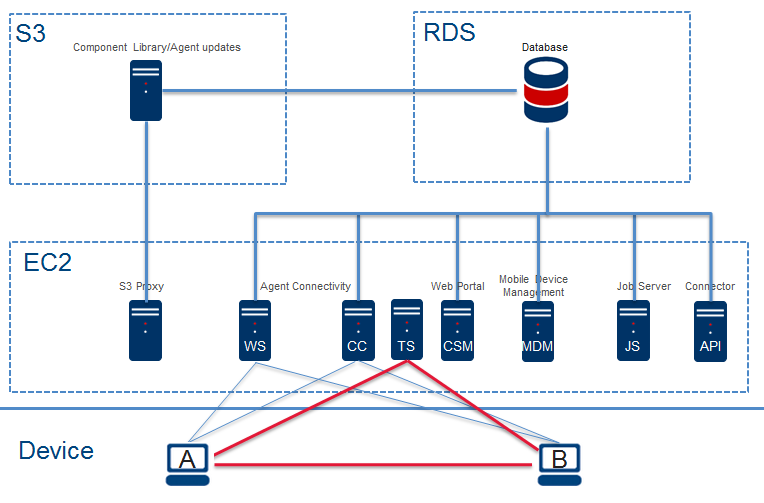
To make the most of the tunnel server grid, ensure that the IP addresses relevant to your geographic location are added to the allowlist and outbound traffic on port 443 is open on your own and your endpoints' firewalls.
Folders and file paths used by Datto RMM
When working with antivirus solutions, such as Datto AV, there may be a need to exclude certain files or folders that Datto RMM uses to ensure it behaves consistently.
Excluding the following locations from being targeted by your AV policy can help prevent it from flagging Datto RMM as unwanted or malicious:
- Datto RMM folder paths:
- C:\Program Files (x86)\CentraStage\
- C:\ProgramData\CentraStage\
- Datto RMM executable paths:
- C:\Program Files (x86)\CentraStage\CagService.exe
- C:\ProgramData\CentraStage\AEMAgent\AEMAgent.exe
- C:\Program Files (x86)\CentraStage\gui.exe
- C:\ProgramData\CentraStage\AEMAgent\RMM.WebRemote\*\RMM.WebRemote.exe
- C:\ProgramData\CentraStage\AEMAgent\RMM.WebRemote\*\RMM.RTC.Proxy\RMM.RTC.Proxy.exe
IMPORTANT While this is a proven list of known locations to exclude for Datto AV, your antivirus configuration may differ. Always check the AV developer documentation for recommended best practices before making any changes.
IMPORTANT If your antivirus product has flagged the Datto RMM Agent installer as malicious, contact your antivirus provider and request that they mark the installer as a false positive to allow it through.
Datto AV exclusions
When Datto AV is deployed alongside Datto RMM, allowlisting the folder and file paths listed above may be necessary to avoid conflicts and to ensure it behaves consistently.
To learn more, refer to Working with exclusions in your Datto AV policy in the Datto EDR help documentation.
Microsoft Defender exclusions
Organizations using Microsoft Defender Antivirus or Microsoft Defender for Endpoint should review Microsoft's guidance for configuring antivirus exclusions and attack surface reduction (ASR) exclusions. Microsoft provides centralized management through Microsoft Intune, Group Policy, Configuration Manager, and the Microsoft Defender portal.
Microsoft documentation links:
- Microsoft Defender Antivirus exclusions: Configure and validate exclusions based on file extension and folder location. Also applies to Microsoft Defender for Endpoint.
- Attack Surface Reduction (ASR) rules: Attack surface reduction (ASR) rules reference for Microsoft Defender for Endpoint.
Inbound and tunnel server IP addresses for Datto RMM
For information on how to obtain a list of inbound and tunnel server IP addresses for Datto RMM, refer to FQDNs/DNS A records.
ComStore component and Software Management URLs
If you are downloading and running components from the ComStore, add storage.centrastage.net and storage.rmm.datto.com to the allowlist. Additionally, if you use any of the following software applications either as a ComStore component or via Software Management, make sure to add the relevant URL(s) to the allowlist:
| Software | Operating System | URL |
|---|---|---|
| 7-Zip | Windows | https://www.7-zip.org |
| Adobe Acrobat Reader DC | Windows, macOS | https://ardownload2.adobe.com |
| Adobe Air | Windows, macOS | https://airsdk.harman.com |
| Bitdefender Endpoint Security Tools | Windows | http://download.bitdefender.com and https://cloudgz.gravityzone.bitdefender.com |
| Bitdefender GravityZone - Deployment/Management | Windows, macOS, Linux | http://download.bitdefender.com |
| Citrix Workspace | Windows, macOS | https://downloads.citrix.com |
|
Datto Secure Edge |
Windows, macOS |
https://cf-dl.datto.com |
| ESET Direct Endpoint Management - Deployment | Windows, macOS | https://update.esetusa.com |
| FileZilla Client | Windows | https://filezilla-project.org |
| Foxit Reader | Windows | https://www.foxitsoftware.com |
| Google Chrome | Windows, macOS | http://dl.google.com |
| Huntress Agent Deployment | Windows | https://huntress.io |
| Java Runtime Environment 8 (latest update) | Windows | https://javadl.oracle.com and https://sdlc-esd.oracle.com |
| Liongard Agent | Windows | https://agents.static.liongard.com |
| Microsoft .NET Desktop Runtime | Windows | https://builds.dotnet.microsoft.com |
| Microsoft Office 365 (Current and Semi-Annual Channels) | Windows | http://dl.delivery.mp.microsoft.com and https://download.microsoft.com https://clients.config.office.net |
| Microsoft Teams | Windows | https://aka.ms and https://teams.microsoft.com |
| Microsoft Visual C++ Redistributable | Windows | https://aka.ms and https://download.visualstudio.microsoft.com |
| Mozilla Firefox | Windows, macOS | https://download.mozilla.org |
| Mozilla Thunderbird | Windows, macOS | https://download.mozilla.org and https://download-installer.cdn.mozilla.net |
| Notepad++ | Windows | https://notepad-plus-plus.org |
| Paint.NET x86/x64 | Windows | https://www.dotpdn.com |
| PuTTY | Windows | https://the.earth.li (official mirror) |
| Trend Micro Worry-Free Services - Deployment | Windows | https://wfbs-svc-nabu-aal.trendmicro.com or https://wfbs-svc-emea-aal.trendmicro.com (depending on geographical region) |
| VLC Media Player | Windows | https://www.mirrorservice.org https://download.videolan.org |
| VMWare Tools | Windows | https://packages.vmware.com |
| Webroot SecureAnywhere Endpoint Protection | Windows | https://anywhere.webrootcloudav.com |
| Windows 10 & 11 Upgrade Components | Windows | http://dl.delivery.mp.microsoft.com and https://download.microsoft.com |
| WithSecure (F-Secure) Various | Windows | https://download.sp.f-secure.com |
| Zoom | Windows, macOS |
https://www.zoom.us https://cdn.zoom.us |


