Datto RMM 15.1.0 release notes
Schedule*
| Platform | Date | From (UTC) | To (UTC) | Duration |
|---|---|---|---|---|
| Syrah (APAC) | Thursday, July 30, 2026 | 14:00 | 18:00 | 4 hrs |
| Vidal (US East) | Tuesday, August 18, 2026 | 08:00 | 12:00 | 4 hrs |
| Concord (US East) | Thursday, August 20, 2026 | 08:00 | 12:00 | 4 hrs |
| Zinfandel (US West) | Tuesday, August 25, 2026 | 08:00 | 12:00 | 4 hrs |
| Merlot (EU2) | Thursday, September 3, 2026 | 18:30 | 22:30 | 4 hrs |
| Pinotage (EU1) | Tuesday, September 8, 2026 | 18:30 | 22:30 | 4 hrs |
NOTE *The schedule is subject to change. Check the Status page for regular updates. Any changes made to the original schedule are denoted in red.
IMPORTANT This is a full platform and Agent release; therefore, partners should expect brief disconnections of the Agent during the update window.
Datto RMM Agent version upon release deployment: 11994
Interim releases
Datto RMM Version 15.1.1
Updates in the 15.1.1 release include Web Remote 2.0 WebRTC DNS fallback to public DNS, and several applied fixes. For full release notes, refer to Datto RMM 15.1.1 interim release notes.
Announcements
Notes in this section are related to important upcoming changes that are coming as part of this or a future release.
Agent Support for legacy OS versions
Starting with this release, the Datto RMM agent will no longer be supported on Windows Server 2012 or Windows Server 2012 R2, which have already reached end-of-life and no longer receive security or compatibility updates from Microsoft.
New agent installations will no longer be supported on these operating systems or other legacy Windows, macOS or Linux versions not listed on our Supported operating systems and Agent requirements page. Existing agents already installed with previously supported operating systems may continue connecting to the Datto RMM platform but will no longer receive agent updates or be maintained, tested, or supported by Kaseya going forward, and we cannot guarantee compatibility with future product updates.
Running production workloads on unsupported operating systems exposes them to unpatched vulnerabilities and increasing compatibility risk. We strongly recommend upgrading managed devices to a supported operating system as soon as possible to:
- Continue receiving product updates and security fixes
- Ensure compatibility with future Datto RMM releases
- Maintain compliance with regulatory frameworks such as FIPS, CMMC, and similar standards, which typically require running on vendor-supported operating systems
Legacy policy enforcement deprecation
In this release, legacy Webroot and Power Management policies will no longer be enforced on Datto RMM Agent installed machines.
Dedicated session storage for the Datto RMM web UI
The Datto RMM web UI now uses a dedicated ElastiCache instance for session storage, separate from the shared cache used by other platform services. This change reduces the risk of login failures caused by cache overload.
NOTE All users will be logged out during the deployment maintenance window for this release, which will also affect wallboards that are normally unaffected by maintenance windows
About the release
The 15.1.0 release is the fourth of our 2026 releases. See below for the highlights, along with the full list of fixes and improvements. As always, we look forward to your feedback as we continue to improve the product with each release.
The Datto RMM team is reaffirming its commitment to delivering important updates more frequently through officially recognized interim releases. These releases will typically include urgent bug fixes or minor enhancements and will not require scheduled maintenance windows. Details of the updates since the previous full release will be included in Datto RMM 15.1.0 release notes.
AI Insights:
Extended context for Activity Log Insights
Activity Log Insights now analyzes up to 10,000 recent activities, a significant increase from the previous limit of 500. Refer to Activity Log Insights.
- Complete summaries for high-volume tenants: AI-generated summaries can now address the full range of up to 10,000 activity log entries.
- Two selectable time ranges: We refactored the analysis window to a choice of 24 hours or 7 days.
- Balanced limit: Analysis covers the selected time range or 10,000 activities, whichever is reached first, to ensure both smaller sites and larger sites with high device counts get the same quality of Insights.
Extended context for Device Insights
Adding Monitors, Metrics, and Patch Policies completes coverage of all device-related data sets. Kaseya Intelligence can now reason about real device health and performance issues, not just static inventory and alerts. Refer to Device Insights.
- Monitors: Insights can now reference and count the monitors configured on a device.
- Metrics: Performance data is included, improving answers to questions about device health and overall performance.
- Patch policies: Patch policy context enables more accurate responses to patch management questions.
NOTE Activity Log Insights and Device Insights are currently available to all customers in early access.
Microsoft 365 integration
Automatic agent deployment to Intune-managed Windows devices
The Microsoft 365 (M365) integration can now automatically deploy RMM agents to Windows devices through Intune, in addition to the existing Cloud PC deployment capability. Refer to Auto-deploy RMM Agents from Intune.
- Simple setup: Map an M365 tenant to a Site in the All Tenants section, then enable the RMM agent deployment toggle.
- Targeting the right devices: RMM agents are installed only on fully Intune-enrolled Windows devices.
- Set-and-forget: All current and future Intune-enrolled devices are covered automatically, with no manual configuration needed. No more blind spots: every Intune-enrolled Windows device shows up in Datto RMM from day one.
NOTE Deployment through Intune requires an Intune license, which is included with Microsoft 365 Business Premium, E3, and E5, or available through standalone Intune licenses.
NOTE To enable Datto RMM Agent deployment through Intune for a Microsoft 365 Integration established before the 15.1.0 release, you need to disable and re-enable the integration. Refer to Disable the Microsoft 365 Integration and Enable the Microsoft 365 Integration.
Web Remote: new video streaming engine (early access)
We're excited to introduce our new video streaming engine for Web Remote, now available in early access as part of RMM 15.1.
This new video protocol is a ground-up replacement of the legacy streaming architecture, designed to deliver:
- Smoother, clearer remote sessions: Improved visual fidelity, especially for text and UI elements, making it easier for technicians to read and interact with remote screens.
- Lower latency under real-world network conditions: Sessions feel more responsive, even on challenging or variable networks.
- Greater session stability and reliability: Fewer unexpected disconnections and more graceful recovery from network interruptions.
How to try it: The new video engine is available to all customers during early access; no opt-in is required. When connecting with Web Remote, click the Web Remote 2.0 link to start a session using the new protocol. The existing Web Remote experience remains fully available and unaffected. Refer to Initiate a Web Remote session.
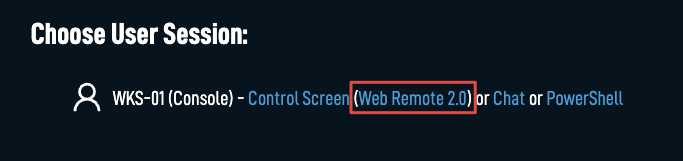
For more information on Web Remote 2.0, refer to Web Remote 2.0 early access.
Network Discovery improvements:
Associated credentials table on Network Node tab
A new Network Node tab in Network Discovery provides a dedicated view for managing credentials used by configured Network Nodes. You can now add, edit, delete, and review site-level credentials, and review account-level credentials, including automatically and manually created ones, from a single, consolidated interface. Refer to Networks.
New Network Discovery wizard
Sites with no existing Network Nodes now clearly indicate that there is no network node configured for that site, and will display a guided setup wizard that walks you through nominating several Network Nodes, defining subnets, associating credentials, and activating discovery, all in one place. This replaces the previous manual configuration flow and reduces the steps required to get Network Discovery running on a new site. Refer to Configure your network and initiate network discovery.
API improvements:
Device and site patch details via REST API
Two new REST API v2 endpoints are available: GET /v2/device/{deviceUid}/patches and GET /v2/sites/{siteUid}/patches. These endpoints return full patch metadata for a specific device or site, matching the detail currently visible in the UI and enabling external systems to retrieve and act on patch data programmatically.
API keys: Security Level and Component Level access restrictions
API keys now support two new permission controls: API Security Level and API Component Level. These settings allow administrators to restrict which security level and which component-level resources an API key can access, providing more granular control over API key permissions independently of user Security Level memberships. Refer to API.
Patch Management: "Last Patching" date field for devices
A new Last Patching date field is now tracked for each device (requiring the Datto RMM Agent to be on version 11616 minimum). The field appears in the Patch Management section of the Device Details page and is available as a column in the Devices and Deleted Devices tables. Additionally, Last Patching can be used as a filter criterion in custom Device Filters.
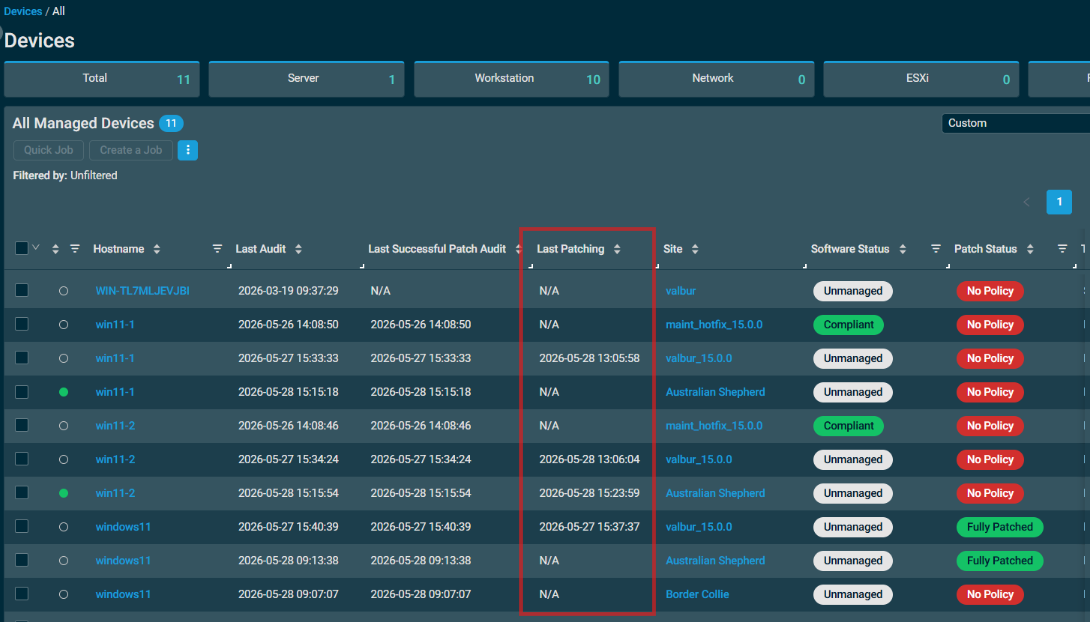
Devices table improvements:
Patch Management column category
The Column Chooser in the Devices table now includes a dedicated Patch Management category. You can use this category to quickly find and enable patch-related columns without scrolling through the full column list. Refer to Column Chooser - Devices.
Software Management column category
The Column Chooser in the Devices table now includes a dedicated Software Management category. You can use this category to quickly find and enable software-related columns without scrolling through the full column list. Refer to Column Chooser - Devices.
User Defined Fields (UDFs): data type support
You can now assign Boolean, Number, Date, and Text data types to User-Defined Fields, reducing input errors and improving data consistency across your devices. Refer to UDF data types.

Key improvements:
- UI-enforced type validation: The UI enforces data types when editing UDF values. Scripts, components, and API integrations can still write any value to a UDF; values that don't conform to the configured type will be flagged as a type mismatch in the UI.
- Type mismatch visibility: When a device's stored value doesn't match the UDF's configured type, an inline warning icon and tooltip appear on the Device List, Device Details, Filters, and Policy/Job/Report target surfaces. A new "Is Type Mismatch" filter criterion lets you target these devices directly.
- Filter validation: Saved filters referencing a mismatched UDF display a warning icon across all surfaces. Editing a filter with a mismatched criterion highlights it with a red border and blocks saving until it's corrected.
- Non-destructive type changes & smarter sorting: Changing a UDF's data type preserves all existing values, flagging incompatible ones as mismatched rather than deleting them. Sorting a UDF column groups mismatched values separately from valid entries for clearer results.
Web Remote and Agent updated to .NET 10
The Web Remote component and the Agent process (AEMAgent) now run on .NET 10, replacing .NET 8 ahead of its end-of-support date in November 2026. Both components have been updated simultaneously to ensure they run on the same runtime version.
Privacy mode: leftover files no longer cause unexpected activation
Privacy mode can no longer be triggered by residual files left on a device from a previous Datto RMM installation by another MSP. Previously, deploying the agent to a device that retained those files would unexpectedly enable privacy mode even when no policy or setting in your environment enforced it.
Fedora 42: agent installation now supported
The Datto RMM agent can now be installed on Fedora 42.
Audit Only patch policies no longer trigger unintended device actions
Patch Management policies configured as Audit Only no longer cause devices to reboot, shut down, or update the Last Patching date as if patches had not been applied.
AI Insights: IP and MAC addresses now visible in responses
Device Insights responses no longer mask IP and MAC address values. In previous AI Insights early access stages, these were redacted intentionally by data guardrails as part of our strict data and security reviews. Addresses are now returned as expected when they are relevant to the query and helps raise the context and troubleshooting capabilities.
Microsoft 365 integration improvements:
Customized tables view in All Users
The All Users page now has the same familiar customizable table view and saved view options used in other parts of the UI, providing a common look and feel while letting users configure their own column layouts.
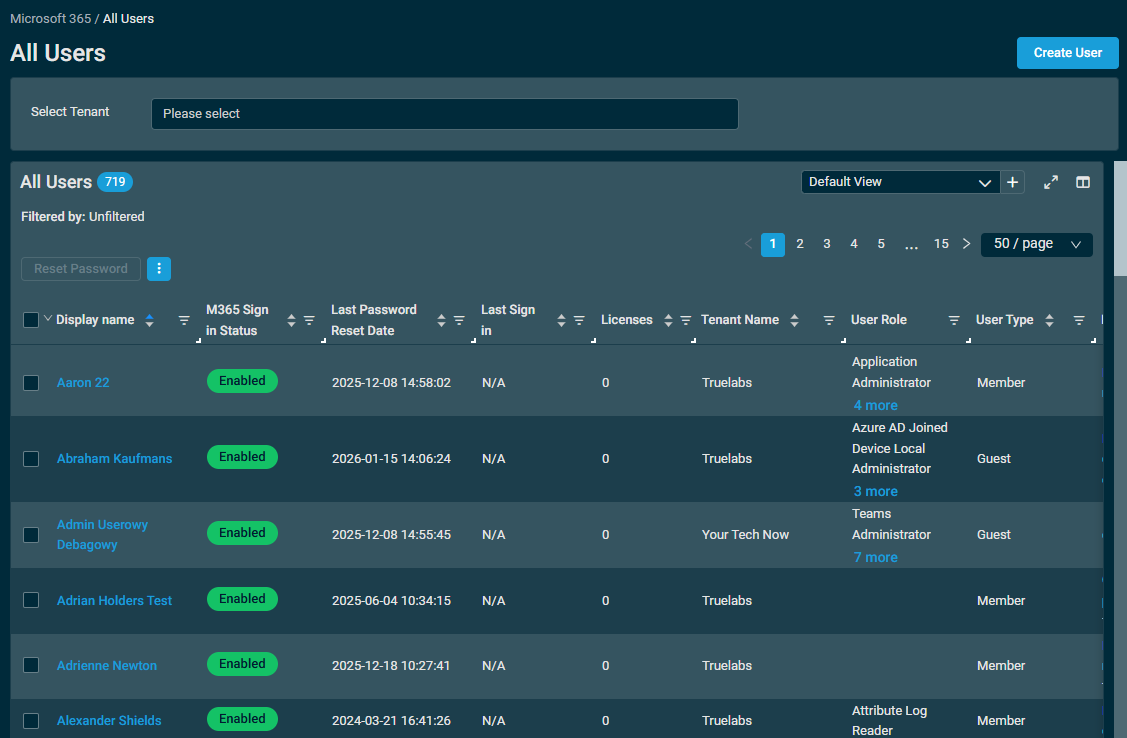
MFA status in All Users page
With this release, the All Users page now shows Multi-factor Authentication (MFA) status as two new optional columns. MFA Status shows which users have registered for MFA; Conditional Access Status shows whether Conditional Access policies are enforcing it.
Together, these columns answer the two questions every MFA audit comes down to: has the user set up MFA, and is anything enforcing it? Seeing both side by side exposes coverage gaps across every tenant without signing in to each Microsoft admin portal. Refer to All Users.
-
For auditing: Quickly filter down to unprotected accounts and export the result as evidence for security reviews, compliance, or cyber insurance requirements.
-
For support: Technicians can confirm a user's registration and enforcement status directly from the ticket workflow for faster triage of common M365 sign-in issues.
NOTE Entra ID P1 or above is required to view MFA status in the All Users page
Entra ID P1 or above is included in:
- Microsoft 365 E3: Includes Entra ID P1. Microsoft Entra ID P1 is included with Microsoft 365 E3 for enterprise customers and Microsoft 365 Business Premium for small to medium businesses.
- Microsoft 365 Business Premium: Includes Entra ID P1 (same source as above)
- Microsoft 365 E5: Includes Entra ID P2 (which supersedes P1) — Microsoft Entra ID P2 is available as a standalone product or included with Microsoft 365 E5 for enterprise customers. microsoft
- Enterprise Mobility + Security (EMS) E3: Includes P1; EMS E5 — includes P2. These aren't "M365 bundles" per se, but are commonly bundled alongside M365 E3/E5 as part of the same SKU family.
NOT included (Entra ID Free only):
- Microsoft 365 Business Standard
- Microsoft 365 Apps for Business
- Microsoft 365 Family/Personal
In summary: MFA Status and Conditional Access Status can only be viewed properly for users on Microsoft 365 Business Premium or above.
For more information, refer to Microsoft Entra Licensing in the Microsoft support documentation.
Support for standalone tenant integration
The M365 integration now supports connecting to one standalone tenant. This means Datto RMM customers not operating as an MSP can now connect to a single M365 tenant and manage it with the same capabilities as the existing CSP integration. Refer to Prerequisites.
NOTE The integration can only operate in one mode, either multi-tenant CSP or single-tenant.
Additions to the ComStore
We release new ComStore components and update existing ones every month. Notable additions this month include the following:
- Microsoft Defender Update Monitor [WIN]: Instructs Defender to perform a signature update. Run on a regular cadence to keep Defender signature updates out of the Windows Update queue.
- Lock Workstation [WIN]: Sends a Windows device back to the lock screen.
- User Toolkit (Local) [WIN]: Creates, deletes, enables, disables, unlocks, or changes the password for a local user, optionally by replacing it first if forgotten. Can also add users to, or remove them from, groups. Alternatively can be used with no arguments to display a detailed list of all users known to the local device. This component combines the functionality of and replaces several now deprecated components.
For more information on changes to the ComStore, refer to ComStore updates.
NOTE To access a full list of ComStore components, refer to List of ComStore components.
Advanced Software Management: July updates
New titles
- 7-zip x64
- Git
Refer to Advanced Software Management and Advanced Software Management application catalog.
Want to know what's coming next?
Interested in what we're currently working on and the broader roadmap vision? Check out the Datto RMM resources feed and watch the latest Quarterly Innovations Update for a glimpse into product priorities.
Updates in this release
Agent Browser
| Type | Summary |
|---|---|
| Fix | Resolved an issue where User Tasks with a variable of type Date were missing the date selection field in the Agent Browser, resulting in an "Index was out of range" error when attempting to run the task. |
Autotask PSA Integration
| Type | Summary |
|---|---|
| Fix | Resolved an issue where Autotask Company to RMM Site mappings could unexpectedly change or reset without any user interaction. Tickets and device syncs were routed to incorrect mapped companies in PSA. Mappings now remain stable after being set. |
| Fix | Resolved an issue where Autotask integration site mappings were being lost intermittently, causing tickets to be routed to incorrect companies in PSA. The root cause of the cache reversion behavior that triggered mapping loss has been resolved. |
| Fix | Restored automatic Datto RMM alert resolution when partners in the Autotask DE zone complete a ticket. |
Device management
| Type | Summary |
|---|---|
| Fix | Resolved an issue where filters containing Service Name or Service Display Name criteria were slow and could fail to return results in the UI. Filter performance for these criteria has been significantly improved. |
Filters
| Type | Summary |
|---|---|
| Fix | Resolved an issue where filters containing Service Name or Service Display Name criteria were slow and could fail to return results in the UI. Filter performance for these criteria has been significantly improved. |
Integrated Customer Billing (Autotask and Kaseya BMS)
| Type | Summary |
|---|---|
| Fix | Resolved an issue where Integrated Customer Billing was syncing doubled unit counts for mapped services, causing inflated billing values in connected PSA contracts. Unit counts now sync correctly. |
| Fix | Resolved an issue where Integrated Customer Billing displayed duplicate organizations and sub-organizations in the module company mapping list, making it difficult to complete accurate billing mappings. Duplicate entries no longer appear. |
| Fix | Resolved an issue where Integrated Customer Billing module organizations were not appearing in the Autotask mapping list for some accounts, preventing billing mapping from being completed for those organizations. Affected organizations now appear correctly. |
IT Glue Integration
| Type | Summary |
|---|---|
| Fix | Resolved an issue where IT Glue device-embedded passwords stored in the IT Glue Vault did not prompt for the vault passphrase when accessed from within Datto RMM. Users can now retrieve vaulted embedded passwords as expected. |
MacOS
| Type | Summary |
|---|---|
| Fix | Resolved an issue where Datto RMM Agent log files were not being created on macOS because the agent attempted to write them to a location that requires root permissions. Log files are now created in an accessible location. |
Monitoring
| Type | Summary |
|---|---|
| Fix | Resolved an issue where network device offline alerts were delayed by up to several hours after a device became unreachable by its network node because the platform continued showing the device as online. Offline status and alerts are now reported in a timely manner. |
| Fix | Resolved an issue where the Windows Defender UAV monitor failed to correctly detect Defender's operational state, even though Defender itself was functioning. |
Patch Management
| Type | Summary |
|---|---|
| Fix | Resolved an issue where WSUS settings were applied to a device even when the Configure Windows Server Update Services (WSUS) settings setting was unchecked in the Windows Update policy. |
| Fix | Resolved an issue where some devices would show the Reboot Required patch status when no reboot is required. |
User interface
| Type | Summary |
|---|---|
| Fix | Resolved an issue where jobs on certain platform instances intermittently failed with an "HTTP-status 504: Gateway Time-out" error and appeared to stay in Pending status for extended periods before eventually completing. |
| Fix | Resolved an issue where the global Software Management page failed to load for some accounts, returning a 504 error. |
| Fix | Resolved an issue where attempting to move a device to another site produced a blank screen. Devices can now be moved between sites without error. |
| Fix | Resolved an issue where clicking an alert name produced a blank screen for some users. Alerts can now be opened and viewed normally. |
| Fix | Fixed an issue where performance metrics on the Device Metrics card could display inconsistently or fail to load data on devices running non-English Windows operating systems. |
ComStore updates
IMPORTANT This table does not list updates for components that are installed via Software Management.
NOTE To access a full list of ComStore components, refer to List of ComStore components.
| Component Name | Platform | New/Changed | Description/Change Summary |
|---|---|---|---|
| HOSTS Toolkit | Windows | New | |
| File/Directory Toolkit | Windows | New | |
| Install Updates with SUPER | macOS | Updated | Updated to version 5.1, which supports the newest versions of macOS. |
| Bitdefender GravityZone - Device Management | All | Updated | Vendor update. |
| Bitdefender GravityZone - Device Monitor | All | Updated | Vendor update. |
| Bitdefender GravityZone Endpoint Management [Datto Companion APP] | All | Updated | Vendor update. |
| User Activity Monitor | Windows | Updated | Improved compatibility checks with some Windows systems. |
| Monitor Local Admin Group | Windows | Updated | Improved compatibility checks with some Windows systems. |
| Lenovo Client Update - Monitor | Windows | New | |
| Lenovo Client Update - Apply | Windows | New | |
| Disk Cleanup | Windows | Updated | Added ability to clear crash dumps and Windows logs, and expanded browser support. |
| Microsoft 365 Apps (Office) - Monthly Enterprise | Windows | New |
Microsoft are de-emphasising the Semi-Annual Enterprise channel and encouraging users to adopt the Monthly Enterprise channel instead. Accordingly, in August 2026, the Semi-Annual Channel Component will be deprecated and Software Management will be available for Current or Monthly Enterprise. |
| Microsoft Office 365 (Semi-Annual Enterprise) | Windows | Deprecated (August) | |
| Monitor Windows Firewall State | Windows | Updated | Monitoring now evaluates ActiveStore configuration rather than the local profile state alone. |
| Install IT Glue Browser Extension | Windows | Updated | Updated to return Firefox functionality. |
| User Toolkit (Local) | Windows | New | |
| Dell Server Monitor | Windows | Updated | Numerous compatibility improvements across OMReport, RacAdm, and Redfish versions. |
| Microsoft Secure Boot CA Audit | Windows | Updated | Improved UEFI verification. |
| Microsoft Defender Update Monitor | Windows | New | Updates Defender on a schedule, keeping Defender updates out of Windows Update queue. |
| Threatdown OneView Endpoint Agent Deployment | macOS | Updated | Vendor update. |
| ThreatDown OneView Endpoint Agent Deployment | Linux | Updated | Vendor update. |
| ThreatDown Monitor | macOS | Updated | Vendor update. |
| ThreatDown Monitor | Linux | Updated | Vendor update. |
| Windows Reliability Index Monitor | Windows | Updated | Numerous compatibility improvements. |
| Microsoft .NET Runtime 8.0.12 Installer | Windows | New | Specifically for Dell Command|Update, which can be very picky about .NET Runtime versions. |
| Dell Command-Update: Monitor/Install | Windows | Updated | Script now automatically keeps Dell Command|Update up-to-date. |
| Microsoft 365 Apps (Office) Configuration Tool | Windows | Updated | Updated to favour Monthly Enterprise channel and updated branding to Microsoft 365. |
| Lock Workstation | Windows | New | |
| Toggle DHCP | Windows | New | |
| RMMmax Components | Win, Mac, Linux | New and Updated | Vendor updates and new releases. |
| Datto Endpoint Backup Agent v2 | Windows | Updated | Added ability to "clean install", which generates a new Agent UID. If the old UID has not been removed, users will be charged twice. |
| Get Detailed File Information or Delete | Windows | Deprecated | Replaced with "File/Directory Toolkit". |
| Server Role Detection v2 | Windows | Deprecated | Replaced with "Server Role Detection v3". |
| Monitor if Application is not installed | Windows | Deprecated | Duplicates "Software Detection Monitor". |
| Add User to Local Administrators Group | Windows | Deprecated | Replaced with "User Toolkit (Local)". |
| Remove User from Local Administrators Group | Windows | Deprecated | Replaced with "User Toolkit (Local)". |
| Audit Local Users + Administrators | Windows | Deprecated | Replaced with "User Toolkit (Local)". |
The following components have been updated to accommodate 300 UDFs:
| Component Name | Platform |
|---|---|
| Site Name in UDF | Windows |
| SIP Monitor | macOS |
| SilNite (Silent Knight) Scan | macOS |
| Lost Device Security Suite | Windows |
| Microsoft Entra Device ID in UDF | Windows |
| Network Speed Test | Windows |
| Server Role Detection v3 | Windows |
| Security (Antivirus) Monitor | Windows |
| Registry Monitor | Windows |
| Reboot Required Monitor v2 | Windows |
| PowerShell Version Audit | Windows |
| OneDrive Sync Status Monitor | Windows |
| Monitor Device for Windows Update KBs | Windows |
| Microsoft Secure Boot CA Monitor | Windows |
| Log4Shell Enumeration, Mitigation and Attack Detection Tool | Windows |
| Hyper-V Host Location Tool | Windows |
| Get/Set Default Browser | Windows |
| Get Largest Files and Folders on Disk (DattoSize) | Windows |
| Get Installed SQL Instances to User-Defined Field | Windows |
| Get File Version | Windows |
| Get Default Browser | macOS |
| Forensic Audit | Windows |
| FileVault 2 | macOS |
| Enforce Inactivity Timeout | Windows |
| Disable or Enable USB Storage | Windows |
| Device Uptime (Percentage) Monitor | Windows |
| Detect Windows keys | Windows |
| Detect Boot Type (BIOS/UEFI) | Windows |
| Datto File Protection & Server Monitor | Windows |
| Datto Endpoint Backup (Unified) Monitor | Windows |
| Datto EDR Maintenance | Windows |
| Datto EDR Maintenance | macOS |
| Windows 11 Readiness Check | Windows |
| Configure Windows Targeted Release Version | Windows |
| Check Windows Downgrade Rights/BIOS Windows Key | Windows |
| BitLocker & TPM Audit | Windows |
| Azure Active Directory Audit | Windows |
| Audit/Monitor Battery Health | macOS |
| Audit/Monitor Administrative Users | macOS |
| Audit Windows Licence/License Status | Windows |
| Audit Wi-Fi Connection | Windows |
| Audit Wi-Fi Connection | macOS |
| Approximate OS First-Install Date from Directories | Windows |
| Administrative User Monitor | Windows |
| Audit User Languages | macOS |
| Audit User Account Control (UAC) | Windows |
| Audit OS Time Zone | Windows |
| Audit Microsoft 365 Apps (Office) Click2Run Channel | Windows |
| Audit Installed OS Languages | Windows |
| Audit Active Power Plan | Windows |
| Agent Health Direct-Check | Windows |
| Write Data to/Clear UDF | Windows |
| Windows Update Toolkit | Windows |
| Windows Build Identification Tool | Windows |
| Windows 10 ESU Monitor | Windows |
| Uptime Monitor | Windows |
| Update Monitor | macOS |
| Toggle Windows Update in Settings | Windows |
| Toggle Script-Block Logging | Windows |
| Toggle 'New Outlook' Auto-Migration | Windows |
| Toggle Embedded Files in OneNote | Windows |
| RocketCyber Agent | Windows |


