Datto RMM 14.9.0 release notes
Schedule*
| Platform | Date | From (UTC) | To (UTC) | Duration |
|---|---|---|---|---|
| Syrah (APAC) | Thursday, April 9, 2026 | 14:00 | 18:00 | 4 hrs |
| Concord (US East) | Monday, April 13, 2026 | 08:00 | 12:00 | 4 hrs |
| Pinotage (EU1) | Tuesday, April 14, 2026 | 17:00 | 21:00 | 4 hrs |
| Vidal (US East) | Wednesday, April 15, 2026 | 08:00 | 12:00 | 4 hrs |
| Zinfandel (US West) | Thursday, April 16, 2026 | 08:00 | 12:00 | 4 hrs |
| Merlot (EU2) | Monday, April 20, 2026 | 17:00 | 21:00 | 4 hrs |
NOTE *The schedule is subject to change. Check the Status page for regular updates. Any changes made to the original schedule are denoted in red.
IMPORTANT This is a full platform and Agent release; therefore, partners should expect brief disconnections of the Agent during the update window.
Datto RMM Agent version upon release deployment: 11433
Announcements
Notes in this section are related to upcoming changes that are not directly related to this release, but are important for upcoming releases or changes to Datto RMM.
Additional subnets: Migrating to CIDR format
Starting with the 15.0/15.1 release, Additional Subnets will use CIDR notation (for example: 192.168.1.0/24) instead of the IP ranges format. CIDR is the modern industry standard for defining network ranges — it's more precise, consistent with broader networking tools, and reduces the risk of misconfiguration. All existing additional subnet entries will be automatically converted to CIDR format upon upgrade. No action is required on your end.
About the release
The 14.9.0 release is the second of our 2026 releases. Please see below for the highlights, along with the full list of fixes and improvements. As always, we look forward to your feedback as we continue to improve the product with each release.
The Datto RMM team is reaffirming its commitment to delivering important updates more frequently through officially recognized interim releases. These releases will typically include urgent bug fixes or minor enhancements and will not require scheduled maintenance windows. Details of the updates since the previous full release will be included in Updates since this release.
Device Insights early access
Device Insights is a Kaseya Intelligence powered feature built into the Device Summary page that allows technicians to interact with device data using natural language prompts. It brings together and contextualizes information such as alerts, patch management, hardware audits, installed software, and activity logs into a single, prompt-driven interface.
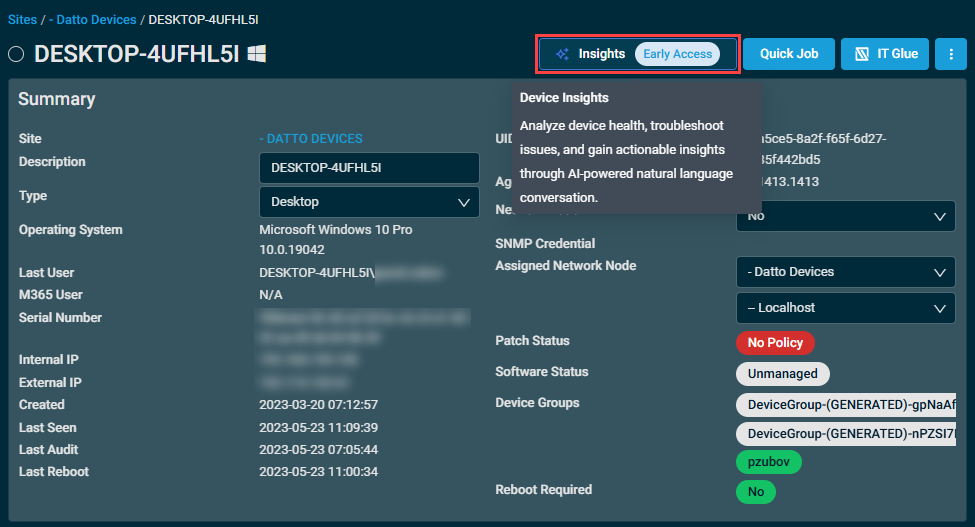
This feature is available in early access, giving our customers the opportunity to participate in future development. To learn more, refer to Device Insights.
Activity Log Insights early access
Activity Log Insights is a Kaseya Intelligence powered feature built into the Activity Log page that allows technicians to interact with activity data using natural language prompts. It brings together and contextualizes information from the Activity Log, such as patch management, remote control sessions, job deployments, agent updates, and UI actions taken by technicians into a single, prompt-driven interface.
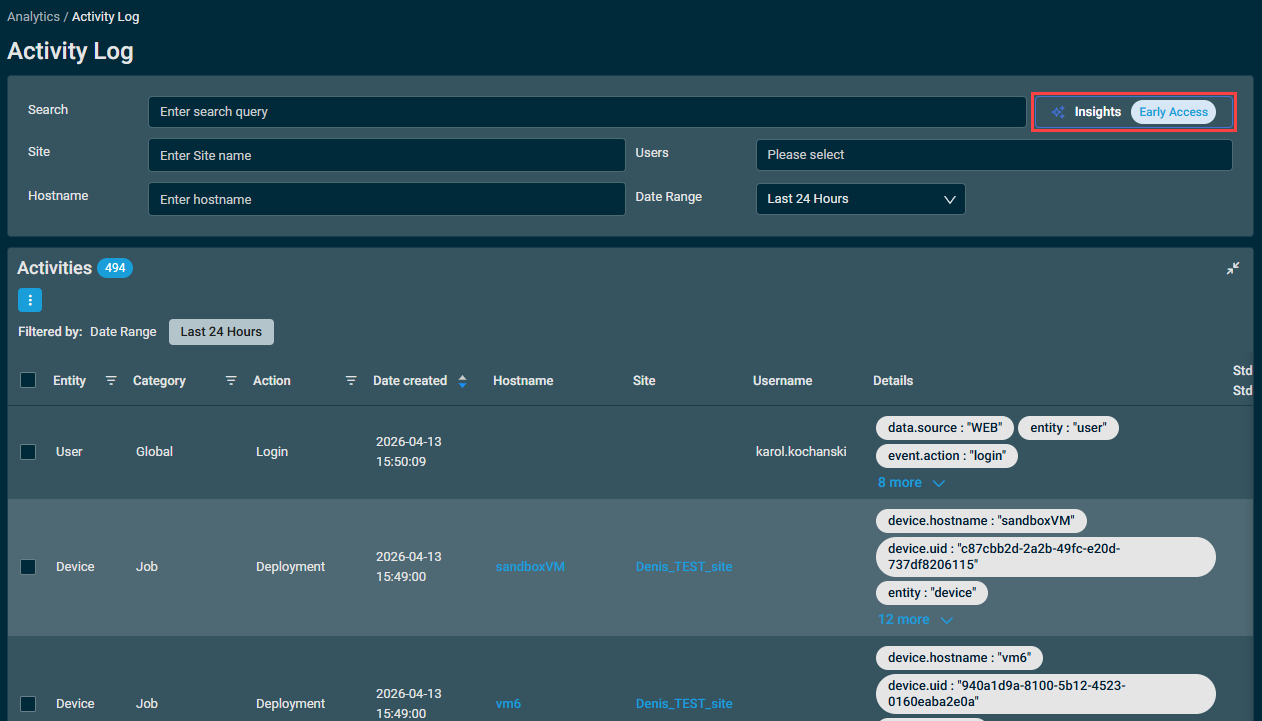
This feature is available in early access, giving our customers the opportunity to participate in future development. To learn more, refer to Activity Log Insights.
Management of historic job results
Technicians can now view the full execution history of scheduled jobs directly in the Datto RMM user interface. The execution history provides details for each job run, including execution time, targeted devices, results (success or failure), and output logs. This information helps with auditing past activity and troubleshooting issues. Refer to Job History.
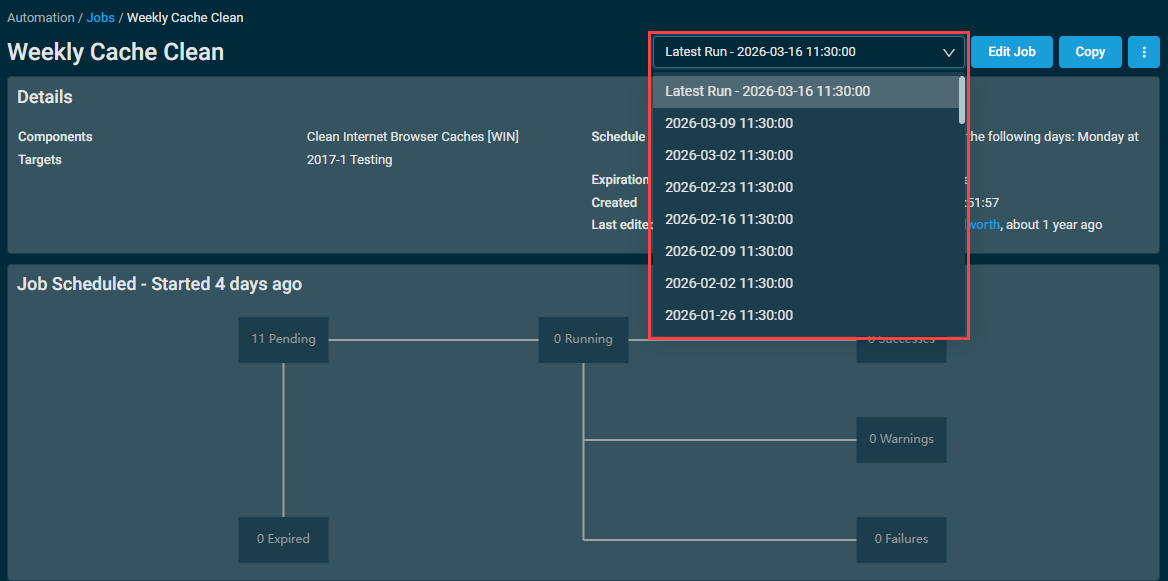
The job execution history is accessible from the Details section of the job results page.
A new drop-down selector, located next to the Edit Job button, displays which run is selected, and allows users to choose which job run to review; the default selection is the most recent run.
The Devices table and Job Summary section will show information based on the selected run date.
Web Remote updates
Automatic channel switching for improved performance
Web Remote will now proactively switch communication channels when degraded network conditions are detected, ensuring that it is always using the channel with the lowest latency. This improves connection speed and reliability, ensuring you stay connected when working on remote devices.
Enhanced tunnel selection logic
Web Remote now includes enhanced tunnel selection logic to ensure sessions connect through the optimal tunnel server for that region. This reduces initial connection failures and improves overall performance.
Improved backend logging
Web Remote browser console errors are now logged to the backend, allowing easier diagnosis and resolution of remote connection issues.
Patch Management feature update support
Patch Management policies now support fully automated deployment of Windows feature updates as part of the regular patching process, without requiring separate component-based deployments or manual intervention.
Please review and update the approval rules in your Patch Management policies to ensure they align with your desired level of automation for feature updates.
NOTE You can limit the Feature version for a Windows device by using the Configure Windows Targeted Release Version [WIN] component. This component locks down the highest feature version a Windows device can be updated to.
Increased UDF capacity
The number of user-defined fields (UDFs) that you can define has increased to 300 per device. This enables a much greater capacity to capture and store information for automation, reporting, and integrations.
- UI components have been updated to efficiently display, search, and manage the expanded UDF set.
- Default sort order:
- UDFs with custom names are listed first and sorted alphabetically by name. Any remaining UDFs without custom names appear afterward, sorted numerically (UDF1, UDF2, etc.).
- Device lists and filters continue to support displaying and sorting up to 30 selected UDF columns at a time.
- API endpoints for retrieving and updating UDFs are compatible with the increased limit.
Datto RMM licenses and billing updates
- Kaseya 365 customers are no longer restricted by their Kaseya 365 device count when adding devices in Datto RMM. You can now add as many devices as needed, and any usage above your Kaseya 365 license allotment will be billed automatically.
- The Licenses page in Datto RMM now always displays variable usage for all license types, even when you have no committed quantity or subscription. This ensures that your in-product license usage always matches your monthly invoice, eliminating confusion and making billing more transparent.
Microsoft 365 integration: Automatic deployment of Datto RMM agents To Windows 365 CloudPCs
Datto RMM agents now install automatically on Windows 365 Business Cloud PCs via the M365 Integration, providing full visibility and management of physical and virtual endpoints from one platform. This update removes blind spots for MSPs managing cloud-first or hybrid device estates that lack a traditional physical network, enabling onboarding, monitoring, patching, and support for Cloud PC users with the same workflows and tools used for traditional devices. Refer to Microsoft 365 Integration.
NOTE To push Datto RMM agents to CloudPCs via M365 Integrations, refresh the main integration authentication to add the required Windows 365 API permissions for proper functionality. Navigate to Setup > Integrations > Microsoft 365 to refresh the integration.
Additions to the ComStore
We release new ComStore components and update existing ones every month. Notable additions this month include the following:
- Microsoft Secure Boot CA Monitor [WIN]: Use this component to ensure devices have valid, up-to-date Certificate Authorities (CAs) for Secure Boot, and fix devices which don't.
- Datto Endpoint Backup v2 [MAC]: Full release of Datto Endpoint Backup v2 for macOS.
- Dell Server Monitor [WIN]: Replaces Dell OpenManage-based monitors for separate fields. This new monitor supports OpenManage, RACADM, and the Redfish API to monitor a Dell server.
NOTE To access a full list of ComStore components, refer to List of ComStore components.
Advanced Software Management: March updates
Refer to Advanced Software Management and Advanced Software Management application catalog.
Updates since this release
Below are release notes for any minor releases that occurred during this release cycle before the next full release. Releases are organized in order with the highest release number at the top.
NOTE No interim release information yet. Check back here for updates.
Want to know what's coming next?
Interested in what we’re currently working on and the broader roadmap vision? Check out the Datto RMM resources feed and watch the latest Quarterly Innovations Update for a glimpse into product priorities.
Updates in this release
Audit
| Type | Summary |
|---|---|
| Fix | Windows service audits have been updated to tolerate corrupt service entries, preventing the failure of the entire audit when underlying data is compromised. |
Autotask PSA integration
| Type | Summary |
|---|---|
| Fix | Extended ASCII characters no longer change the value to a question mark when syncing UDFs to Autotask. |
Datto Continuity integration
| Type | Summary |
|---|---|
| Fix | Resolved an issue where the Datto Continuity integration page in Datto RMM would sometimes display a None Found message instead of your list of Continuity devices. With this fix, you can reliably view, configure, and edit your Continuity devices directly from the integration page, ensuring seamless management across your Kaseya platform. |
Device management
| Type | Summary |
|---|---|
| Fix | Resolved an issue where CPU and memory data would fail to display on the Metrics card of the device summary for some devices. |
| Fix | The Assigned Network Node field on device pages now persist correctly and display the chosen network node instead of incorrectly reverting to - Localhost. |
KaseyaOne integration
| Type | Summary |
|---|---|
| Fix | Resolved a data consistency issue where organizations deleted from Datto RMM continued to appear on the KaseyaOne Organization Dashboard page. The fix ensures that deletions in Datto RMM are accurately reflected in KaseyaOne, improving data integrity and user trust across the integrated platform experience. |
Splashtop integration
| Type | Summary |
|---|---|
| Foundation | The Splashtop Streamer for macOS was updated to version 3.8.0.2. |
| Foundation | The Splashtop Streamer for Windows was updated to version 3.8.0.1. |
User interface
| Type | Summary |
|---|---|
| Foundation | Alert icons on the device summary page now use only the rounded orange icon for consistency. |
| Foundation | The support chatbot icon can now be repositioned, allowing you to access elements of the web interface that would otherwise be hidden by the icon depending on your browser's window size and configuration. |
Software Management
| Type | Summary |
|---|---|
| Fix | Devices now recognize both Webroot and OpenText™ Core Endpoint Protection when reviewing software management compliance status for Webroot SecureAnywhere. |
Web Remote
| Type | Summary |
|---|---|
| Fix | Web Remote sessions from Windows to macOS no longer treat navigational keys (for example: PageUp/PageDown, Home/End, and so forth) as a function key on the endpoint. |
ComStore updates
IMPORTANT This table does not list updates for components that are installed via Software Management.
NOTE To access a full list of ComStore components, refer to List of ComStore components.
| Component Name | Platform | New/Changed | Description/Change Summary |
|---|---|---|---|
| Sysmon | Windows | New | New component to install native Sysmon on supported systems and to remove third-party Sysmon in preparation. |
| Install & Configure Sysmon | Windows | Removed | Removed to accommodate the new Sysmon component. |
| CPU Temperature Monitor v4 | Windows | New | Updated to block execution on Windows Server 2019 until PawnIO is updated to fully support Windows RS5. |
| Agent Health Direct-Check | Windows | Updated | Improved key-verification checks. |
| Microsoft Secure Boot CA Monitor | Windows | New | Use this component to ensure devices have valid, up-to-date Certificate Authorities (CAs) for Secure Boot, and fix devices which don't. |
| OneDrive Sync Status Monitor | Windows | Updated | Improved script-clash logic; added Alert on no data received toggle. |
| RMMNProbe Uninstaller | Windows | New | Removes the RMMNProbe software produced for the Network Monitor early-access release. |
| Datto EDR Maintenance [MAC] | macOS | New | Counterpart to the Windows component to resolve common Datto EDR issues. |
| Display Branded Toast Notification/Reboot | Windows | Updated | Multiple fixes designed to improve compatibility and add persistent alerts. |
| Datto Endpoint Backup v2 [MAC] | macOS | New | Full release of Datto Endpoint Backup v2 for macOS. |
| Datto Endpoint Backup: Retrieve Errors and Warnings from Logs | Windows | Updated | Updated to accommodate new logging locations. |
| Revert Device Isolation | Windows | Updated | Updated to support improved functionality of new Isolator builds. |
| Dell Command-Update: Monitor/Install | Windows | Updated | Updated Dell Command-Update version and logic improvements. |
| Datto Endpoint Backup (Unified) Monitor | Windows | Updated | Updated to accommodate new logging locations. |
| Monitor BitLocker State | Windows | Removed | Removed as functionality is present in the BitLocker & TPM Audit component. |
| Dell Server Monitor | Windows | New | Replaces Dell OpenManage-based monitors for separate fields. This new monitor supports OpenManage, RACADM, and the Redfish API to monitor a Dell server. |
| Monitor Dell OpenManage Chassis (Legacy) | Windows | Removed | Removed as functionality is present in the Dell Server Monitor component. |
| Monitor Dell OpenManage RAID Status (Legacy) | Windows | Removed | |
| Monitor Dell Physical Disk Status (Legacy) | Windows | Removed | |
| Change Wallpaper (Background) and Lock Screen | Windows | New | Script to change users' wallpapers and/or lock screens. Images must be uploaded to third-party storage. |
| Splashtop Streamer Pre-Installer | Windows | Updated | Bugfixes. |
| Splashtop Streamer Pre-Installer [MAC] | macOS | Updated | Bugfixes. |
| Get Detailed File Information or Delete | Windows | Updated | Bugfixes. |
| Write Disk Type to UDF | Windows | Updated | Rewritten to accommodate for edge cases. |
| Get File Version | Windows | New | Gathers a file's version metadata and optionally writes it to a UDF. |
| Install & Activate Windows MAK License/License Key | Windows | Updated | Bugfixes. |
| RocketCyber Agent | Windows | Updated | Vendor update. |
| Liongard Agent | Windows | Updated | |
| Threatdown OneView Endpoint Agent Deployment | Windows | Updated | |
| Threatdown OneView Endpoint Agent Deployment - Server | Windows | Updated | |
| Pia Agent | Windows | Updated | |
| RMMMax Defender Collection | Windows | Updated | |
| RMMMax BleachBit Collection | Windows | Updated | |
| RMMMax Chocolatey Collection | Windows | Updated | |
| RMMMax BitLocker Collection | Windows | Updated | |
| Sophos Central | Windows | Updated |


